Samsung Galaxy S Duos S7562 is a mid range Dual sim Android smartphone. It is powered by 1GHz Cortex A5 processor with 768MB of RAM and Adreno 200 GPU. The device measures 63.1×121.5×10.5 mm and weighs 120 grams. The overall design of the phone is much inspired by the Samsung Flagship model Galaxy S3. Samsung Galaxy S Duos price in India is ₹9,599.
Samsung Galaxy S Duos comes with 5MP primary camera and VGA front facing camera. The camera has features such as auto focus, panorama and photo effects, 2X digital zoom along with LED flash. The dual sim Android smartphone capable of shooting 480p videos at 30fps.Internal memory of the Galaxy S Duos 7562 is 4GB which can be further increased by adding microSD card upto 32GB. The device comes with 1500mAh battery which will provide talk time upto 12 hours and 570 hours of standby time.
Samsung Galaxy S Duos supports GPRS, EDGE, Wi-Fi and Wi-Fi Hotspot, Bluetooth and USB connectivity. It also supports GPS with AGPS service. The S7562 is bundled with popular apps such as Chat ON, SNS Integration, Play Store, Samsung Apps, Google Search apps.
Samsung Galaxy S Duos S7562 is going get Jelly Bean update soon. The updates can be installed through OTA or using the Latest Samsung Kies. With the help of Samsung Kies, the device can be used as modem through USB tethering. The devices with WiFi connectivity can be easily connected through the WiFi Tethering features. Like any other Galaxy Device, this device to support Samsung Mobile PC suite Kies 2.6. It is highly recommended to have Samsung Kies installed in your PC as this device at time requires firmware updates through PC only.
Merits and Demerits of Samsung Galaxy S Duos S7562
Merits of Galaxy S Duos:
Decent snappy processor with 768MB RAM
Dual sim support with Smart Dual feature
Front facing camera support
Stylish and slim design
Excellent battery life for Android Standards
Demerits of Galaxy S Duos:
No HD video recording support. It supports on 480p videos
The touch response is not that great
Phone hangs some times
No Dedicated shutter key
No Ambient Light Sensor
Samsung Galaxy S Duos Specification Summary
Runs on Android 4.0 ICS OS. Upgradable to Jelly Bean
1GHz Cortex A5 processor with 768MB RAM and Adreno 200GPU
4 inch TFT capacitive touch screen with WVGA 480*800 pixel resolution
5MP auto focus camera with LED flash and VGA front facing camera
Dimensions- 63.1×121.5×10.5 mm and weighs 120grams
Accelerometer, Proximity Sensor, Compass sensors
4GB internal memory and expandable memory support upto 32GB
1500mAh battery with talk time upto 12 hours and standby time upto 570 hours.
GPRS, EDGE, Wi-Fi and Wi-Fi Hotspot, Bluetooth and USB
Samsung Galaxy Chat B5330 is a budget touch and type Android smartphone. The device runs on Android ICS OS. The device come with 850Mhz processor with 512MB of RAM. Galaxy Chat sports 3 inch TFT capacitive touch screen with QVGA screen resolution. It has physical QWERTY keypad.
Samsung Galaxy Chat come with 2MP primary camera with video recording capability. Internal memory of the device is 4GB in that only 2GB is available for apps. Memory can be expanded through microSD card upto 32GB.
For connectivity, Galaxy Chat supports GPRS,EDGE, 3G, Bluetoth and WiFi. It is interesting fact that this phone is going to get update to Jelly Bean in the coming month according to a blog post on Samsung mobile which receives Jelly Bean Update. Samsung Galaxy Chat is available in Black, White and in pink colors.
Overall it is a good phone considering the price tag and features. The other budget smartphones from Samsung such as Galaxy Y, Galaxy Y Pro or even Samsung Galaxy Ace Duos runs on Android Gingerbread OS and comes with 256MB or 370MB of RAM. Except camera, this is the best buy considering the price.
Samsung Galaxy Chat B5330 Features:
Android v4.0 (Ice Cream Sandwich) OS
2 MP Primary Camera
3-inch TFT Capacitive Touchscreen
850 MHz Processor
Physical QWERTY Keypad
GPRS,EDGE, 3G, Bluetoth and WiFi
Expandable Storage Capacity of 32 GB
Advantages and Disadvantages of Samsung Galaxy Chat B5330:
Pros of Samsung Galaxy Chat:
Touch and type interface with decent well spaced QWERTY keypad and capacitive touch screen
This article is deprecated! Any technical information contained herein likely refers to software versions that are now obsolete. Please visit our new post on How to download Smart Switch Latest Samsung PC Suite for the updated post of this.
Samsung PC suite are convenient tools which helps in doing multiple tasks such as syncing contacts, Data, Multimedia files etc. Samsung PC suite are useful in updating the firmwares of the Samsung Devices. With slight difference in features and compatibility of the device Samsung is providing four types of PC suites names Samsung Kies, Samsung PC Studio, New PC Studio and Samsung Kies Air. Below are the features of these PC suites along with the system requirements. Samsung Kies: Samsung Kies latest version is 2.3. However depending the phone you have you need to select compatible version of the Samsung Kies. Below are the some of the key features of Samsung Kies.
Key Features of Samsung Kies Mobile PC Suite
Connect your mobile without wire to the PC: One of the features added to latest Samsung Kies is connecting mobile to PC through WiFi and Sync between the two.
Mobile Firmware Updates: Whenever, the Samsung Mobile is connected to Kies either by USB or WiFi, Kies automatically notifies if any latest firmware available to the device.
Sync Contacts with Outlook or Google or Yahoo: This functionality provides more control over in syncing the contacts with outlook,Google or Yahoo. This also helps to add or edit the contacts in the convenient of PC.
Organize Music Files and Sync: With Samsung Kies, it is easier to organize the music playlist and sync them with the mobile.
Backup Photos and Videos from Mobile to PC: Samsung Kies provides easy ways to back up your precious photo and videos which are available on your mobile phone to PC.
System requirement to Install Samsung Kies on Windows based PC:
Compatible OS:Windows XP, Windows Vista, Windows 7 (32/64bit are supported)
CPU:Intel Core 2 Duo 2.0GHz or above (recommended)
Minimum memory size (RAM):1.00GB (recommended)
Free hard drive space:At least 500MB (recommended)
Screen resolution:1024 x 768(600), 32 bit or above
Required software:Net Framework 3.5 SP1 or above, Windows Media Player 10 or above, DirectX 9.0C
* For Windows Mobile, ActiveSync (Windows XP) or Device Centre (Windows Vista/7)
Update: Samsung has release newer version of Kies. The latest Samsung PC suite is Kies 3.0. This is compatible with the devices running on Android 4.3 or later. Samsung Kies for Mac Systems: Samsung Kies is available for Mac system too. The System requirements for installing Samsung Kies on Mac is given below.
OS:MacOS X version 10.5 or later
CPU:1.8GHz Intel or faster processor
Minimum memory size (RAM):512MB or more
Free hard drive space:At least 100MB (recommended)
Free download for Samsung Kies are available for both PC and Mac. For Download the latest Samsung Kies Click Here. Samsung PC Studio 3: Samsung PC Studio is another tool with additional features to enhance the experience. Key Features of Samsung PC Studio 3: PC Studio Launcher: Provides the shortcut icons to start the PC studio applications Phone Editor (Manage contacts and more):Allows you to view, edit and organize the personal information in your phone on your PC. Also lets your copy and move information between your phone and your PC. Message Manager (Manage messages):View, edit and organize your phone messages on your PC. You can also send text messages or multimedia messages with this application when it is connected to the phone PC Sync (Synchronize):Synchronize personal information data (names and contact information) in your phone. The programmes supported are Microsoft ® Outlook® and Outlook Express Phone Explorer (Manage files):Manage multimedia files in your phone on your PC and to transfer files between your phone and PC Networking Wizard (Manage Internet connections):Access the Internet using the connected Phone as a modem MMS Composer (Compose Multiimedia messages):Make and edit multimedia using photos, movies, sounds and text. The messages can be saved or sent via the connected phone. Multimedia Manager (Manage multiimedia files):Modify various media files (below) imported from your mobile phone, PC or CD and create a new one. This also has a play function.
Video – Import 3gp, 3g2, mpeg, mpg, mp4, avi, divx, asf, wmv. Convert to mp4, 3gp
Music – Import mp3, aac, mp4, 3gp, 3g2, m4a, mmf, midi, amr. Save as mp3, wav, amr, aac, m4a
Photo – Import jpeg, bmp, gif, png, wbmp, tif. Save as jpeg, bmp, png, gif
Multimedia Player (Play multimedia files)
Play multimedia files (compatible with your phone) such as movies and sounds.
Live Update – You can update your Samsung PC Studio to the latest version.
Live Update can be performed as follows.
Run Samsung PC Studio. In the Launcher window, select the Tools > Live Update menu. (Make sure the PC is connected to the internet.)
When the Welcome window appears, click the Start button.
The available programme update list appears. Click the Next button.
Save all unsaved tasks and close all PC Studio applications. Click the OK button to proceed to the update process.
When the update is done, click the Finish button to close Live Update. (In case the Live Update programme itself has been updated, click the Start button to repeat steps 3 to 5 for updating other components.)
System Requirements to install Samsung PC Studio 3:
Windows 2000 (with Service pack 4 or higher), Windows XP or Vista
At least 300 MB of free disk space
Connection with the phone must be through USB, IrDA or Bluetooth
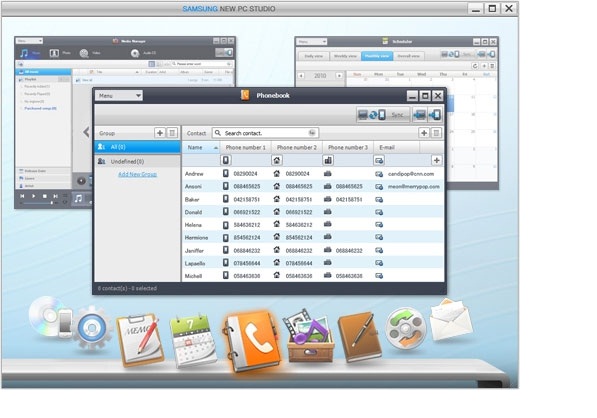
Samsung PC Studio can be downloaded free from Samsung Support page Here.. New PC Studio:ew PC Studio is a program that helps you to use the data inside your PC and mobile phone better. New PC Studio allows users to manage not only the music, photos and videos in their PC but also the important personal information such as the phonebook, messages and schedules in their mobile phones by exporting them to PC. System Requirements for installing Samsung PC Studio:
One of the following ways is needed to connect the mobile phone to a PC.
USB cable and compatible port
Bluetooth device and software
One of the following programs must be installed to connect Bluetooth.
Microsoft Stack : Windows XP Service Pack 2 or higher
Widcomm Stack : 1.4.2.10 SP5 or higher
Bluesoleil Stack : 1.6.0 or higher
Toshiba Stack : 3.0 or higher
Samsung New PC Studio(NPC) free download is available in the Samsung Support page.
Samsung has launched Galaxy Note II in India, Germany,Australia and in South Korea. Samsung Galaxy Note II price in India is ₹39,990(Approximately $750) where as in Germany it costs €699.
Samsung Galaxy Note 2 is the successor of original Samsung Phablet Galaxy Note. This new Note II comes with 5.5 inch Super AMOLED capacitive touch screen with 720*1280 pixels(~267 ppi pixel density) . The display screen has Gorilla Glass 2 protections. Samsung Galaxy Note II is powered by 1.6GHz Cortex A9 quad core processor with Exynos 4412 Quad Chipset and Mali-400MP GPU. The phone houses 2GB RAM and has options chose between inbuilt storage capacity between 16/32/64GB. Samsung Galaxy Note 2 also support microSD card upto 64GB.
Samsung Galaxy Note 2 runs on latest Android Jelly Bean OS. For connectivity, it supports GPRS,EDGE, HSDPA, 21 Mbps; HSUPA, 5.76 Mbps; LTE, Cat3, 50 Mbps UL, 100 Mbps DL, Bluetooth, NFC and WiFi. Note 2 sports 8MP primary camera with auto focus and LED flash. For video calling, there is a 1.9MP front facing camera. The battery of the device is Li-3100 mAh.
Samsung Galaxy Ace 2 is the upgraded version of popular Galaxy Ace smartphone. It comes with 800 MHz dual core processor along with 768MB of RAM and Mali 400MP GPU. Internal storage available on this phone is 4GB and it supports upto 32GB of external memory through microSD card. Samsung Galaxy Ace 2 sports 5MP rear camera with LED flash and auto focus. There is a front facing camera for video calling. It is powered by 1500 mAh battery which is rated to provide upto 670 hours of standby time and 16 hours of talk time. Samsung Galaxy Ace 2 price in India is not yet revealed. Its launch in India might be doubtful. Samsung Galaxy Ace 2 can be updated to Android 4.1 through OTA or Samsung Kies PC suite.
Features of Samsung Galaxy Ace 2
:
3.8 inch PLS TFT capacitive touch screen
Dual core 800MHz processor
4GB internal memory and 768 MB RAM
2G,3G, WiFi and NFC support
Upto 32 GB memory expansion support through microSD card
Runs on Android Gingerbread OS
Main disadvantages of Samsung Galaxy Ace 2
:
No Android ICS out of the box
All plastic constructions
Least powerful dual core processor in the market
Samsung Galaxy Ace 2 Specifications
:
OS:Android OS, v2.3 Gingerbread
User Interface:TouchWiz v4.0 UI
Java:Yes, via Java MIDP emulator
Processor:Dual-core 800 MHz
Chipset:NovaThor U8500
Graphics:Mali-400MP
RAM:768
Size:118.3 x 62.2 x 10.5 mm
Weight:122 grams
Display:3.8 inch PLS TFT capacitive touchscreen, 16M colors.
Screen Resolution:480 x 800 pixels,(~246 ppi pixel density).
Primary Camera:Yes,5 MP, 2592×1944 pixels
Secondary Camera:Yes,VGA
Flash:LED
Video Recording:Yes, 720p@30fps.
Camera Features:autofocus,Geo-tagging, face and smile detection.
Battery type: Li-Ion 1500 mAh.
Talktime:Up to 16 h 20 min (2G) / Up to 7 h 30 min (3G).
Standby Time:Up to 670 h (2G) / Up to 640 h (3G).
GPRS:Yes
EDGE:Yes
3G:Yes, HSDPA, 14.4 Mbps
WiFi:Yes, 802.11 b/g/n
USB connectivity:Yes, micro USB, v2.
Tethering:USB, Wi-fi Hotspot.
GPS Support:Yes.with A-GPS support and GLONASS.
Bluetooth:Yes
Audio Jack:3.5 mm
DLNA:Yes
Internal memory:4 GB
Expandable Memory Slot:microSD, upto 32 GB
Music Player:Yes, Supports MP3/WAV/eAAC+/FLAC player.
Video Player:Yes, Supports MP4/H.264/H.263 player.