

Category: Smartphones

  • Samsung Galaxy A27 5G Launched in India: Price & Specs

    Samsung has officially expanded its popular A-series lineup in India with the launch of the Samsung Galaxy A27 5G. Designed specifically to cater to younger consumers, this smartphone blends a sleek design, robust performance, long-term software support, and a comprehensive suite of advanced AI features into a highly competitive price bracket.

    The smartphone will hit shelves on July 3, 2026, offering buyers cutting-edge tech alongside attractive zero down-payment EMI plans and instant cashback incentives.
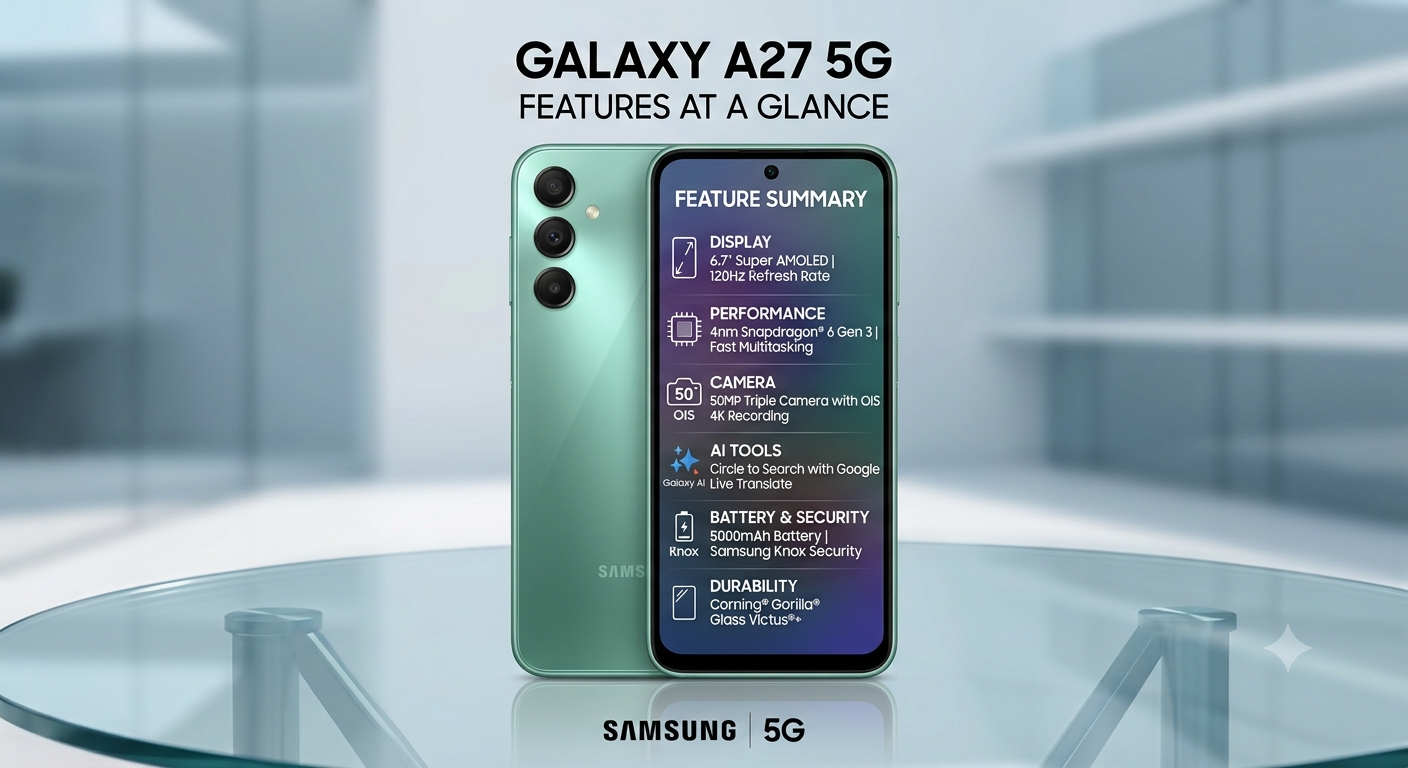
    Samsung Galaxy A27 5G

    Core Specifications of the New Samsung Galaxy A27 5G

    1. Immersive 120Hz Super AMOLED Display

    The Galaxy A27 5G features an enhanced 6.7-inch Super AMOLED display with a fluid 120Hz refresh rate, ensuring vibrant color reproduction and razor-sharp clarity for media consumption and gaming.

    • Infinity-O Design: The screen incorporates a minimized camera hole punch to deliver a highly immersive viewing experience.
    • Premium Protection: To safe-guard against drops and scratches, the front is reinforced with Corning® Gorilla® Glass Victus®+.

    2. Powerful Hardware and Seamless Multitasking

    Under the hood, the device is powered by an ultra-efficient 4nm Snapdragon® 6 Gen 3 mobile platform, complemented by advanced LPDDRX5 RAM and fast UFS 3.1 internal storage.

    • Enhanced GPU: Upgraded graphics acceleration provides lag-free gaming, smoother UI animations, and fast data transfer speeds.
    • Effortless Processing: The combination allows users to seamlessly jump between resource-heavy applications, browse content-heavy web pages, stream 4K videos, and deploy on-device AI tools simultaneously.

    3. Advanced AI-Powered Triple Camera System

    Photography enthusiasts will appreciate the hardware and software synergy built into the triple-lens array. The phone houses a 50MP primary sensor with Optical Image Stabilization (OIS) and 4K video recording, paired with a macro camera and an ultra-wide angle lens capable of capturing a 115° field of view. The high-resolution system outputs images up to 300dpi, making them ideal for high-quality physical prints. On the front, a 12MP HDR camera ensures evenly exposed selfies and clear video calling.

    The camera experience is further bolstered by built-in Samsung AI tools:

    • Object Eraser: Instantly delete unwanted objects or backgrounds from pictures.
    • Edit Suggestions: Automatically analyzes photographs and suggests optimized adjustments.
    • My Filter: Allows users to copy and duplicate color profiles or styles from other images onto their own shots.

    4. Smart Productivity and Galaxy AI Tools

    The device comes deeply integrated with smart tools designed to assist in daily tasks:

    • Circle to Search with Google: Allows users to quickly look up items on their screens via multi-object recognition.
    • Voice Transcription: The Voice Recorder app transcribes and translates audio in real-time across 22 languages—making it ideal for capturing corporate meeting notes.
    • AI Engine Support: Deeper systemic integration with tools like Google Gemini and Perplexity across domestic Galaxy applications like the Gallery.
    • Live Transcription: Translates or transcribes phone calls and voicemails instantly into English, Hindi, and Gujarati.
    • Bixby: Serves as the central on-device agent, operating key settings and tasks through natural language processing.

    5. Massive Battery, Enterprise Security, and Unmatched Software Longevity

    • Battery & Power: Packaged with a long-lasting 5000mAh battery that supports fast charging to comfortably manage a full day of heavy usage.
    • Industry-Leading Support: Samsung is promising 6 generations of Android OS/One UI updates alongside 6 years of security patches, keeping the device fresh and relevant into the next decade.
    • Knox Vault Protection: Fortified by Samsung Knox and Knox Vault hardware security architectures to safeguard private photos, secure documents, and personal details.
    • Samsung Wallet: Fully integrated for contactless Tap-to-Pay, UPI payment integration, and the secure storage of digital IDs or travel documentation.

    Samsung Galaxy A27 5G Price in India and Launch Offers

    The Samsung Galaxy A27 5G is available in three striking finishes: Light Green, Light Pink, and Black. It will be sold across official Samsung Exclusive Stores, retail partner outlets, Samsung.com, and prominent online marketplaces.

    Every model qualifies for an immediate ₹3,000 multi-bank and UPI cashback discount. Additionally, flexible consumer financing options include zero-down payment schemes lasting up to 15 months, or an extended 24-month EMI layout featuring an 8-month down payment via chosen non-banking financial institutions (NBFCs).

  • 4 Easy Ways to Take a Screenshot on Samsung Galaxy S26 Ultra

    Captured a high score in a game, a funny meme, or an important document? Taking a screenshot on the Samsung Galaxy S26 Ultra is simple once you know the shortcuts. In this guide, we’ll walk you through four different methods, plus a bonus tip on how to capture long scrolling pages.

    Watch the Step-by-Step Video:

    Method 1: Using the Quick Settings Panel

    This is the best method if you want a clean, software-based capture without fumbling for buttons.

    • Step: Swipe down from the top-right of your screen to open the full Quick Settings.
    • Step: Tap the “Take Screenshot” icon.
    • Pro Tip: If the icon is missing, tap the Pencil icon (top of the panel) > Add Control, and drag the “Take Screenshot” toggle into your active panel for easy access.

    Method 2: Using the Edge Panel (One-Handed)

    The Edge Panel is perfect for those who find the Ultra a bit large for two-handed button presses.

    1. Pull out the Edge handle from the side of your screen.
    2. Navigate to the Tasks page and tap “Take Screenshot.”
    3. Setup: If you don’t see the Tasks page, tap the Settings (gear) icon at the bottom of the Edge panel and ensure “Tasks” is checked.

    Method 3: The Palm Swipe Gesture

    Samsung’s signature gesture is still here and works beautifully on the S26 series.

    • How-to: Swipe the edge of your palm across the screen from left to right (or vice versa).
    • Important: Make sure your hand is slightly touching the glass as you swipe.

    Method 4: Hardware Buttons

    The classic way that works on almost every Android phone.

    • The Combo: Quickly press the Power Button and Volume Down button at the same time.
    • Note: Do not hold them down; a quick, simultaneous click is all you need.

    Bonus: How to Take a Scroll (Long) Screenshot

    Need to capture an entire webpage or a long chat thread?

    1. Take a regular screenshot using any method above.
    2. Tap the “Scroll Capture” (double down arrows) icon in the toolbar that appears at the bottom.
    3. Keep tapping the icon until you’ve reached the bottom of the page.

    Where are my screenshots saved?

    All your captures are automatically organized. To find them:

    • Open the Gallery app.
    • Go to Albums.
    • Look for the folder named “Screenshots.”
  • How to Turn Off or Restart Samsung Galaxy S26 Ultra (3 Easy Ways)

    Confused about how to turn off your new Samsung Galaxy S26 Ultra? You aren’t alone. By default, pressing and holding the side button triggers the Gemini digital assistant instead of the power menu. Whether you want to restart your device or completely shut it down, here are the three fastest ways to do it.

    Watch the Video Guide:

    Method 1: The Button Combination (Quickest Way)

    The most common way to access the power menu is by using the physical hardware buttons.

    • Simultaneously press and hold the Volume Down button and the Side (Power) Button for about one second.
    • The power menu will appear on your screen. Tap Power Off or Restart.

    Method 2: Use the Quick Settings Panel

    If you prefer not to use physical buttons, you can use the software shortcut.

    1. Swipe down from the top-right corner of your screen to open the Quick Panel.
    2. Locate the Power Icon at the top right (near the Settings gear).
    3. Tap the icon to bring up the power options.

    Method 3: Remap the Side Key (Permanent Fix)

    If you want the side button to act like a traditional power button again, follow these steps to remap it:

    1. Swipe down the Quick Panel and tap the Power Icon.
    2. Select Side button settings at the bottom.
    3. Under the “Press and hold” section, change the selection from “Digital Assistant” (Gemini) to “Power off menu.”

    Now, whenever you long-press the side key, your Galaxy S26 Ultra will show the power menu directly!


    Which Galaxy Models Does This Work For?

    These steps are identical for the entire S26 lineup:

    • Samsung Galaxy S26
    • Samsung Galaxy S26 Plus
    • Samsung Galaxy S26 Ultra

    Final Thoughts

    Samsung’s shift toward digital assistants can make simple tasks like restarting your phone feel complicated, but these shortcuts make it easy. For more practical tech guides and Galaxy S26 Ultra tips, stay tuned to tech2touch.com.

    Don’t forget to subscribe to our YouTube channel for more visual guides!


  • Google Pixel 10a Launched in India: Faster Charging, Brighter Screen, and 7 Years of AI


    Google has officially launched the Pixel 10a in India, priced at INR 49,999. While it keeps the massive 5,100 mAh battery that made the Pixel 9a a battery king, the 10a focuses on refining the experience with faster charging, a tougher build, and a significantly brighter display.

    A Display Built for the Indian Sun

    One of the biggest frustrations with mid-range phones is not being able to see the screen outdoors. Google solved this by giving the Pixel 10a a 6.3-inch Actua display with a peak brightness of 3,000 nits. This makes it the brightest A-series phone ever made, ensuring perfect visibility even on the sunniest days.

    Massive Battery

    Battery anxiety is real, which is why the Pixel 10a features a massive 5,100 mAh battery, promising over 30 hours of life on a single charge.

    • Fast Charging: Support for 30W wired and 10W wireless charging keeps you powered up without the long wait.

    Smarter AI for Better Moments

    The Pixel 10a isn’t just about hardware; it brings the best of Google’s flagship AI to a more accessible price point.

    • Camera Coach: Get real-time tips to frame and capture your shots like a pro.
    • Auto Best Take: Group photos are easier than ever. The AI automatically selects the best expressions for up to 20 people in a single shot.
    • Pixel Drops: Your phone stays “fresh” with monthly updates that add new features long after you buy it.

    Design and Durability

    Google has refined the look with a “bumpless” design and slim, uniform 4mm bezels. It’s also built to take a beating:

    • Gorilla Glass 7i: One of the toughest screens in its price bracket.
    • IP68 Rating: Fully dust and water-resistant for peace of mind.
    • 7 Years of Support: You get seven years of OS and security updates, which is industry-leading for this segment.

    Quick Comparison: Pixel 10a vs. Pixel 9a

    FeaturePixel 9aPixel 10a (New)
    Battery Capacity5,100 mAh5,100 mAh
    Wired Charging23W30W (Faster)
    Wireless Charging7.5W10W (Faster)
    Peak Brightness2,700 Nits3,000 Nits
    Display GlassGorilla Glass 3Gorilla Glass 7i
    ConnectivityStandard 5GSatellite SOS Support

    The Pixel Upgrade Program

    To make the INR 49,999 price tag easier to manage, Google included the 10a in its Pixel Upgrade Program. This offers zero down payment and zero interest EMI plans. After just 9 payments, you can upgrade to the next Pixel effortlessly, regardless of your current phone’s condition.

    Final Verdict: If you already have a Pixel 9a, the 10a is a minor upgrade. But if you are coming from a Pixel 7a or 8a, the combination of the 5,100 mAh battery, 30W charging, and 7 years of updates makes the Pixel 10a the best mid-range investment of 2026.

  • Skip or Buy? Samsung Galaxy M36 5G Review After 15 Days of Use

    I’ve been using the Samsung Galaxy M36 5G as my daily driver for about 15 days, and this is my completely honest, real-world experience. If you are considering buying this phone, this review should help you make a crystal-clear decision.

    ✅ Top 5 Advantages (Pros) of the Samsung Galaxy M36 5G

    1. The Stellar Super AMOLED+ Display with 120Hz

    The display is undoubtedly the biggest highlight of the M36. Colors look bright, punchy, and incredibly natural. Even when battling harsh outdoor sunlight, the screen remains perfectly visible. Whether you’re watching videos, reading, or just scrolling, the visual experience genuinely feels premium and responsive.

    2. Smooth One UI and Unmatched Software Support

    Samsung’s One UI has been smooth and well-organized throughout my usage. What truly sets this phone apart is Samsung’s commitment: promising a remarkable 6 years of long-term software updates. This longevity is a massive advantage that adds substantial value to your purchase.

    3. Excellent Performance for Daily Tasks

    For standard daily usage—calls, WhatsApp, web browsing, banking apps, and light multitasking—the M36 performs flawlessly. I experienced no noticeable lag in regular use. While it’s not built for intense gaming, it handles the everyday workload with impressive speed and stability.

    4. Reliable All-Day Battery Backup

    The 5000 mAh battery delivers reliable stamina. With moderate usage, it easily lasts a full day. If you are a light user, you can certainly stretch it well into the second day. Samsung’s battery optimization is highly effective here.

    5. Decent Daylight Camera with OIS

    The main 50MP camera performs reliably during the day. Photos captured in good light show natural colors, and the inclusion of OIS (Optical Image Stabilization) helps deliver quite decent video stabilization. For casual outdoor photos and videos, the camera holds up well.

    ❌ 5 Key Disadvantages of the Samsung Galaxy M36 5G

    1. Outdated Front Design (The Waterdrop Notch)

    This is a notable aesthetic drawback. The waterdrop notch (U-notch) instantly gives the phone an older appearance. In 2025, a modern punch-hole design has become standard even in budget phones, so seeing this older design on the M36 is a slight disappointment.

    2. Lack of Stereo Sound (Mono Speaker)

    The audio experience is strictly average. There is no stereo sound, and the single bottom-firing speaker lacks immersion. If you frequently watch videos or listen to music without headphones, you will immediately notice this significant limitation.

    3. Slow 25W Charging & No Charger in the Box

    This is arguably the biggest frustration point.

    These two factors combined substantially increase the overall cost and the time spent waiting for a full charge.

    Charging is limited to 25W, which feels genuinely slow when compared to competitors in this price segment.

    More annoyingly, there is no charger included in the box, forcing you to purchase a compatible one separately.

    4. Average Low-Light Camera Performance

    While daytime results are decent, the camera struggles significantly after sunset. Night shots quickly lose detail and appear soft, and highlights tend to be easily blown out. The front camera also falters in low-light conditions. If night photography is a priority, this phone will disappoint.

    5. Not Suitable for Power Users

    If your usage involves heavy multitasking, continuous data use, or resource-intensive apps, you will find the battery drains faster than desired. Combined with the slow charging speed, the M36 is not an ideal device for power users or frequent travelers who need rapid battery top-ups.


    🎯 Final Verdict: Who Should and Shouldn’t Buy It?

    ✔️ Who Should Consider Buying the M36 5G?

    • You prioritize Samsung’s stunning Super AMOLED+ display.
    • You want a clean UI and unmatched long-term software support (6 years).
    • You need a reliable phone mainly for everyday tasks.
    • You prioritize brand trust and after-sales service.
    • You mainly take photos in good daylight conditions.

    ❌ Who Should Avoid It?

    • You expect fast charging and/or a charger included in the box.
    • You demand a modern, premium punch-hole design.
    • You are an avid photographer who takes a lot of low-light photos.
    • You want an immersive media experience with stereo speakers.
    • You are a heavy user who needs rapid, on-the-go charging.