

Category: Smartphones

  • Samsung Galaxy J7 Cons and Pros Review

    Samsung Galaxuy J7 is a midrange smartphone which is launched along with Galaxy J5. The key features of this smartphone are AMOLED display screen, battery life, decent performance, good camera and attractive price tag.  Samsung Galaxy J7 price in India is Rs.14,999.

    Galaxuy J7 comes with 5.5 inch Super AMOLED display screen with resolution of 1280 x 720 Pixels and has decent  pixel density of 267 ppi. As it has Super AMOLED screen, the colour reproduction and  viewing angle are good. One demerit interms of display is, it doesnot have any screen protection such as Corning Gorilla Glass. So it is good have screen gaurd.

    Samsung Galaxy J7 Dual sim
    Samsung Galaxy J7

    Samsung Galaxuy J7 which is available in India is powered by 1.5GHz Exynos 7580 64 Bit Cortex A53 octa core processor coupled with 1.5GB of RAM and Mali T-720 GPU. On day to day usage, we have not faced any laginess. Even we are impressed with the gaming experience. Though there were delay in opening a high end game, once loaded, it handled the games without any issues. The smartphone comes with 16GB of internal storage and has support for microSD card.

    Samsung Galaxy J7 houses 13MP rear primary camera with LED flash and 5MP front facing camera. Both camera performance in outdoor conditions are good. However low light and artificial light condition, camera performance is just average.  Galaxy J7 is a dual sim smartphone and runs on Android 5.1 along with new touchwiz UI.

    Samsung Galaxy J7 has 3000 mAh battery. It provides incredible standby time. For a normal user, this phone will easily last for more than 1 day. The connectivity features of this device includes 2G, 3G, WiFi, Bluetooth and 4G LTE. Galaxy J7 supports USB OTG as well.

    Advantages and Disadvantages of Samsung Galaxy J7

    To summarize the Samsung Galaxy J7 review, we have listed few of the merits and demerits of the device.

    Pros of Galaxy J7

    • Decent performance: The device performance interms of day to day usage, gaming performance is good. The cellular call quality also good. Phone does not get heats up much while playing the games.
    • Good Display: The  display screen on this is good. It offer good viewing angles and colour reproduction.
    • Excellant Battery life:The battery life it provides interms of standby time and screen on time is excellant.
    • Decent Camera: Both front and rear camera does take good quality photos and video in outdoor conditions.

    Cons of Galaxy J7

    • Lacks basic sensors like compass, light sensor etc.
    • No LED Notification and navigation key are not backlite.
    • Low loud speaker output.
    • No noice cancellation mic.
    • No Corning Gorilla Glass screen protection.

    Samsung Galaxy J7 Tips and Tricks

    Taking screenshot on Galaxy J7: For performing print screen on Galaxy J7, press and hold home and power button simultaneously. The screenshot will be taken. The taken screenshot on Galaxy J7 is saved in Gallery->Screenshot folder. You can read more on this here.

    Using Galaxy J7 as modem: You can use Galaxy J7 as modem through USB tethering and WiFi hotspot features. You can access this from Settings->Connections-> Tethering and Mobile hotspot. If you want to learn more on how to access net from PC using Galaxy J7 as modem, then read here.

    Samsung Galaxy J7 PC suite: Samsung Kies 3.0 is the latest PC suite available for Galaxy J7. You can download and install latest Samsung PC suite from the official support page from Samsung Galaxy J7 PC suite.

    Samsung Galaxy J7 Specifications

    • 5.5 inch Super AMOLED 720p HD display.
    • 1.5GHz Exynos 7580 64 Bit Cortex A53 octa core processor, 1.5GB of RAM, Mali T-720 GPU.
    • 2G, 3G, WiFi, Bluetooth and 4G LTE.
    • 3000 mAh battery.
    • Dual sim with Dual Standby.
    • Android 5.1 Lollipop with Touchwiz UI.
    • 13MP rear primary camera with LED flash.
    • 5MP front facing camera.
    • Size: 78.6×152.4×7.5 mm and weight: 171 g.
    • Sensors: Accelerometer, Hall Sensor, Proximity Sensor.
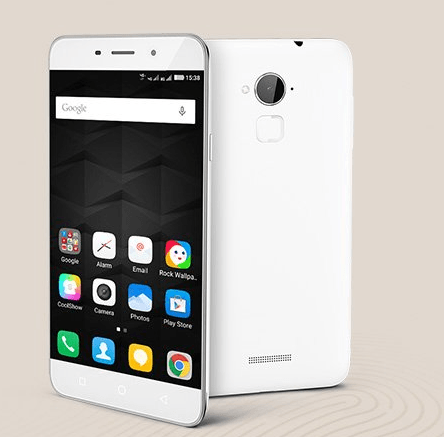
  • Coolpad Note 3 With Fingerprint Scanner and 3GB RAM at Rs.8,999

    Chinees manufacturer Coolpad has launched its Note 3 smartphone in India. The device is exclusively available via Amazon.in. The first flash sale happenes on October 20, 2PM IST. User registration for the sale is already open. Coolpad Note 3 price in India is Rs.8,999. The key features of the device are 5.5 inch 720p HD screen, 3GB RAM and fingerprint scanner.

    Coolpad Note 3 is a dual sim smartphone and runs on Cool UI 6.0 which is based on Android 5.1. Cool UI in this device provides features like multi-window mode, double tap wake up, and smart gesture.The device has 5.5 inch IPS display with resolution of 720×1280 and 267 ppi pixel density. The claimed viewing angle is 178 degrees.

    Note 3 4G LTE Dual sim

    Coolpad Note 3 dual sim Android smartphone is powered by 1.3GHz octa-core MediaTek MT6753 processor coupled with 3GB of LPDDR3 RAM. The device has 16GB of internal storage and support for microSD card upto 64GB. The smartphone is equipped with 13 mega pixel rear auto focus camera with LED flash, f/2.0 aperture and 5 Element HD Lens.  In the front, it has 5MP camera. Both front and rear camera has CMOS image sensor for better image quality.

    Coolpad Note 3 has 3000 mAh battery. One more key feature of this smartphone is Fingerprint scanner. It is said to support 360-degree finger rotation and speedy recognision in 0.5 seconds.  The sensors in the device are compass, gravity, proximity, ambient light, and gyroscope sensors. The connectivity features of Coolpad Note 3 are 4G LTE, 3G, Bluetooth and WiFi. The device will be available in white and black colours.

    Coolpad Note 3 is only smartphone within 10k price tag which has fingerprint scanner and 3GB of RAM. The closest competetor in this price tag are Yu Yureka Plus and Lenovo K3 Note. We will be able to compare how well it performs in real life scenarios only once we get a handson on this device.

    Coolpad Note 3 Specification

    •  1.3GHz octa-core MediaTek MT6753 processor with 3GB RAM
    • Cool UI 6.0 based on Android 5.1 Lollipop.
    • Fingerprint scanner.
    • 720HD 5.5 inch IPS display screen 267 pixel density.
    • 16GB internal storage and support for microSD card.
    • 13MP primary camera with LED flash.
    • 5MP front facing camera.
    • 3000 mAh battery.
  • How to Take Screenshot on Asus Zenfone 2 Laser

    Asus Zenfone 2 Laser is most affordable smartphone under Zenfone 2 series. It has decent specification and competetive price tag. The laser focussed camera is the key attraction of this smartphone. In this post we will learn how to take screenshot on Asus Zenfone 2 Laser. The device runs on Android Lollipop with ZenUI. The ZenUI provide lot of customisation which enhances the user experience. It also includes many features which are very useful. For performing print screen on Zenfone 2 Laser,  there are 3 methods. You can choose any of these screen capture methods.

    Asus Zenfone Laser

    Recommended reading:

    Asus Zenfone 2 Laser Review

    How to take screenshot on Asus Zenfone 2

    How to use Asus Zenfone 2 Laser as Modem or Tethering

    How to Take screenshot on Asus Zenfone 2 Laser

    There are two variants of Asus Zenfone 2 Laser. Both variants support below mentioned ways of capture screen methods.

    Method 1: Default Android method

    It is the most common and widely used method of taking screenshot on any Android smartphone. For this you need to press and hold volume down key and power button simultaneously for few seconds. The screenshot is captured. You can access the taken screenshot from Gallery.

    Method 2: Using Recent apps key

    For taking screenshot on Asus Zenfone 2 Laser using this method, follow the steps given below.

    • First go to the “Settings”. Under settings, you will find “Asus ASUS customised settings” . Tap on to it.
    • In this, choose the ‘Recent apps key’.
    • Under Recent apps key settings, you will find “Tap and hold to capture screen”. Choose that.
    • Now, whenever, you want to take screenshot on any page, just tap and hold recent apps key to take the screenshot.

    Method 3: Take screenshot on Asus Zenfone 2 Laser using Quick Settings

    For enabling this method, you need to customise the Quick Settings menu in Zenfone 2 Laser. For that, follow the steps given below.

    • Go to Quick Settings page by swiping down the screen from top.
    • Tap on edit quick settings icon.
    • In the quick setting option, the top row provides only 4 tools. So you need to disable one app appearing in the top row and choose, screenshot.
    • Tap on to save.
    • Now when you need to take screenshot, go to quick setting menu, you will find screenshot option. Tap on to it to take the screenshot.

    Hope this tutorial on How to Take Screenshot on Asus Zenfone 2 Laser is useful. If you are facing any issues while following the instruction, please share it in the comment section below.

  • Xiaomi Mi4C With USB Type C and 5 inch Full HD display

    Xiaomi Mi4C is midrange smartphone interms of price and high end phone interms of specification sheet. Snapdragon 808 SoC,  5 inch full HD display are the key features of this smartphone. It is launched in China at CNY 1,299 for the 16GB variant and CNY 1499 for the 32GB variants. If you want to buy Xiaomi Mi4C outside China, Gearbest is selling this on great discounted price. For more info you can visit here.

    Xiaomi Mi4C is powered by 64-bit hexa-core Snapdragon 808 processor clocked at 1.8GHz with 2GB/3GB RAM and Adreno 418 GPU. It has internal storage of 16/32GB. It runs on Android Lollipop based MIUI skin. This handset comes with USB Type-C reversible connector. It also has  Edge Tap technology, which Xiaomi claimed it’s their patented technology, which allows the handset to perform different assigned functions with a single tap and double tap on the edges of the handset.

    Dual sim Xiaomi Mi4C

    Xiaomi Mi4C sports 5 inch Full HD(1080×1920 pixels) display. It comes with a features called Sunlight display, which according to company, can be easy to read on the screen of the Mi 4c under the Sun and also comes with night reading mode. The Mi 4c also supports Double Tap feature, which wakes up the screen on double tap.

    Xiaomi Mi4C houses 13MP megapixel rear camera with features like phase detection autofocus and comes with Sony IMX258 or Samsung S5K3M2 sensor.  This handset also features 5MP front facing camera with 85-degree wide angle lens and self-timer.

    Xiaomi Mi4C is a dual sim smartphone and houses 3080mAh battery with support for Quick Charge 2.0. The connectivity features of the device includes 2G, 3G, 4G, Bluetooth and GPS. It also has sensors like Light sensor, G-sensor, Proximity sensor, Hall Sensor.  The Mi4c measures 138.1×69.6×7.8mm and weighs 132 grams and it will be available in Black, Blue, Orange, Pink, and White colours.

    Xiaomi Mi4C specification

    • 64-bit hexa-core Snapdragon 808 processor clocked at 1.8GHz with Adreno 418GPU.
    • 2GB RAM with 16GB builtin storage or 3GB RAM with 32GB internal storage.
    • 5inch full HD display screen.
    • 13MP primary camera and 5MP front facing camera.
    • 2G, 3G, 4G, Bluetooth and GPS.
    • 3080mAh battery with support for Quick Charge 2.0.
  • Huawei Honor 7 Launched in India at Rs.22,999

    Huawei Honor 7 has been finally launched in India. It is globally launched on July this year. All metal unibody design, 5.2 inch full HD display, 20MP primary camera, fingerprint scanner are the key features of this smartphone. Unlike the global variant, in India only single sim variant will go on sale from October 15th via Flipkart. The device will be available with Mystery Gray and Fantasy Silver colour variants. Huawei Honor 7 price in India is Rs.22,999.

    Huawei Honor 7 is powered by company’s own 64-bit octa-core Kirin 935 processor (four Cortex-A53 cores at 2.2GHz + four Cortex-A53 at 1.5GHz) clubbed with 3GB of RAM and ARM’s Mali-T628 GPU. The device has 16GB of internal storage. The 32GB variant and 64 GB inbuilt variants will not released this time in India. It will support microSD card upto 128GB. Honor 7 runs on Android Lollipop with Emotion UI v3.1.

    Huawei Honor 7 India

    Huawei Honor 7 sports 5.2 inch IPS LCD display screen with resolution of 1080×1920 pixels and pixel density of 423 ppi. The device has  20MP rear camera with Sony made IMX230 sensor, f/2.0 aperture lens, 6-lens module, dual-LED flash, and sapphire glass protection. It also has 8MP front-facing 26-mm wide-angle fixed focus camera with a f/2.4 aperture and front facing flash.

    Huawei Honor 7 connectivity feature includes NFC, dual-band Wi-Fi 802.11a/b/g/n/ac, Bluetooth 4.1, GPS/ A-GPS, and 4G LTE.  The device has 3100mAh battery with a quick charging feature that charges the smartphone from zero to full within 1 hour 25 minutes, and zero to 50 percent in 30 minutes.  This smartphone also has  reverse charging feature that lets users charge other devices using the smartphone. Honor 7 measures 143.2×71.9×8.5mm and weighing 157 grams.

    Huawei Honor 7 Specification

    • 64-bit octa-core Kirin 935 processor with 3GB of RAM.
    • 5.2 inch IPS LCD display screen with resolution of 1080×1920 pixels.
    • 20MP rear camera and 8MP front facing camera.
    • NFC, dual-band Wi-Fi 802.11a/b/g/n/ac, Bluetooth 4.1, GPS/ A-GPS, and 4G LTE.
    •  3100mAh battery with a quick charging feature.
    • Android Lollipop with Emotion UI v3.1.