Category: Smartphones

  • How to set Custom ringtone in OnePlus 3 and OnePlus 3T

    OnePlus 3 and OnePlus 3T are considered by many as  best value for money smartphones. Top end specifications, relatively fast android updates and attractive price tag made it popular among the customers who are looking for best smartphone under 30k. In this post we will cover on  how to set Custom ringtone in OnePlus 3 and OnePlus 3T.

    Recommended Reading:

    How to take screenshot on OnePlus 3 & OnePlus 3T

    How to set Custom ringtone in OnePlus 3 and OnePlus 3T

    First we will go through the procedure to set ringtones in OnePlus 3 and OnePlus 3T. Then we will try to cover on how to set different ringtones to different sim cards, how to set different ringtones to different contacts and use custom ringtone.

    How to set ringtone on OnePlus 3 and OnePlus 3T

    • Go to settings->Sound.
    • Under this menu, browse for Phone Ringtone and tap onto it.
    • How to set Custom ringtone in OnePlus 3 and OnePlus 3T
    • You will have list of preloaded ringtone.
    • Chose the one which you want to set as ringtone.

    How to set different ringtones to each sim cards on OnePlus 3 and OnePlus 3T

    • Go to settings->Sound->Phone Ringtone.
    • In the top you have option called Set ringtone for each SIM card.
    • Enable that option by moving the slider to right.
    • Now you have the option to set different ringtones to each sim card.

    How to set different ringtones to each contacts in OnePlus 3 and OnePlus 3T

    • Go to contacts.
    • Here open the contact which you want to set the ringtone by tapping on it.
    • Click on the edit(pencil icon).
    • Tap on menu(top right | icon)
    • Select set ringtone.

    How to set custom MP3 tunes as ringtone

    Above methods works well on pre installed ringtone. To set a custom ringtone of your choice to OnePlus 3 and OnePlus 3T there are many ways. Here is the methods to set custom ringtone without installing any third party apps.

    Set custom MP3 tunes as ringtone without installing third party apps in OnePlus 3 and OnePlus 3T

    • Copy the ringtone of your choice.
    • Paste it onto the ringtone folder in internal storage using pre installed file manager or connecting the OnePlus 3 or OnePlus 3T to PC.
    • How to set Custom ringtone in OnePlus 3 and OnePlus 3T 2
    • Now using the above methods, you can set that tune as ringtone.
  • Moto G5 Plus Review-5 Reason to buy and Not to buy

    Moto G series is the most popular smartphones from Motorola. Moto G5 Plus is the latest smartphone from this series with improved internals and camera performance. So here is our Moto G5 Plus Review based on pros and cons.

    Moto G5 Plus Review

    This Moto G5 Plus Review is based on key merits and demerits. If you want to know on the specifications and features, comparison with Redmi Note 4, please refer our previous post.

    Moto G5 Plus FAQ, Features, Tips and Tricks

    How to set custom ringtone on Moto G5 Plus

    Moto G5 Plus vs Redmi Note 4

    Moto G5 Plus Review -Pros and Cons

    Here is the list of Moto G5 Plus merits and demerits according to us.

    Moto G5 Plus Pros- Reasons to buy

    • Stock Android experience: One of the biggest advantage of Moto G5 Plus is near stock android experience. There is very few customisations but they are useful for most of the users. Also there is no bloatware which interns reduces the space consumed by unwanted apps.
    • Good display panel: Moto G5 Plus comes with 5.2 inch IPS full HD display with around 424 pixel density. The screen has Corning Gorilla Glass 3 protection.  The viewing angles, colour reproduction and sunlight legibility are good. In addition to it, there is Color mode option in the display setting which lets users select between standard and vibrant colour reproduction.
    • Camera: Camera is the one area where most of the Motorola smartphones  struggles. Last years Moto G4 Plus had a decent camera. As a result of company continued to focus more on camera section, Moto G5 Plus delivers better results compared its predecessor.
    • Good general performance: Moto G5 Plus is powered by 2GHz octa-core Snapdragon 625 SoC coupled with Adreno 506 GPU. This is the same SoC used on Redmi Note 4, Zenfone 3 etc. Our review unit came with 4GB of RAM. The day to day activities and gaming performance was excellent during our review period considering the price.
    • Build quality:  Moto G5 Plus is the first phone from Moto G series to feature metal build. As a result of metal build, device feels bit premium in hand.

    Moto G5 Plus Cons- Reasons for not to buy

    No phone is perfect. Moto G5 Plus is no exception to it. So here is the list of demerits of Moto G5 Plus.

    • Late Android security patch updates: Moto G series are known for fast Android updates. But after Lenovo took over Motorola, there is a delay is security patch updates and Android updates.
    • No USB-C port: The device comes with microUSB port for charging and data transfer. It would have been great, if there is a latest USB-C port.
    • Average loudspeaker output: The device comes with single front firing speaker which also works as ear piece. Call quality on the device is excellent but audio via loudspeaker is average.
    • Storage option: Moto G5 plus comes in two variants. One is with 3GB of RAM and another one with 4GB of RAM. 3GB RAM variant has only 16GB of internal storage and 4GB variant has 32GB of internal storage.  Considering the price, internal storage is less for a 3GB variant.
    • Less screen to body ratio: Moto G4 Plus had a body to screen ratio of around 71% whereas Moto G5 Plus screen to body ratio is around 67%.  Due to this, though Moto G5 Plus comes with smaller screen size, overall size of the phone is not much less compared to Moto G4 Plus.
  • Moto Z2 Play FAQ Tips & Tricks Cons

    Motorola launched Moto Z play successor Moto Z2 Play in India with price tag starting from Rs.27,999. Like its predecessor, Moto Z2 Play supports handful of Moto Mods such as JBL SoundBoost 2, Moto TurboPower pack, Moto Gamepad, and Moto Style Shell with wireless charging.

    Moto Z2 Play sports 5.5inch full HD Super AMOLED display of 1080×1920 pixel resolution with pixel density of around 401 ppi pixel.  The device is powered by 2.2GHz octa-core Qualcomm Snapdragon 626 with 4GB of RAM and 64GB of internal storage. There is one more variant of Moto Z2 Play with 3GB of RAM and 32GB of internal storage. Unfortunately, that variant is not yet announced in India.

    Moto Z2 Play measures 156.20 x 76.20 x 5.99 (height x width x thickness) and weighs 145 grams. It runs on Android 7.1.1 out of the box. The device houses 3000 mAh battery.

    Moto Z2 Play comes with 12MP primary camera and 5MP front facing camera. There is a dual tone front facing LED flash as well. The connectivity features of the device are Wi-Fi, GPS, Bluetooth, NFC, FM, 3G and 4G.

    Moto Z2 Play

    Moto Z2 Play FAQ Tips & Tricks Cons

    What are the different variants of Moto Z2 Play available in India?

    Currently one variant of this smartphone is available in India. There is one more variant which is available in some other market with 3GB of RAM and 32GB internal storage variant.

    What are the different colour options available?

    Users can choose this device in two colour variants. One is Lunar Grey and other one is Fine Gold.

    What type of sim cards Moto Z2 Play supports? Does it has dedicated microSD card slot?

    The device supports 2 nano sim  cards. There is a dedicated microSD card slot.

    What are the key differences between Moto Z Play and Moto Z2 Play?

    Both the devices supports Moto Mods. Design looks identical though there is a minor differences.  The key differentiator between the two, according us are display,camera. The new Moto Z2 Play comes with AMOLED screen instead of IPS screen and has much better camera. The Snapdragon 626 is not a major upgrade over Snapdragon 625. Battery on the new device is 3000mAh  compared to Moto Z Play 3510 mAh battery.

    How to take screenshot on Moto Z2 Play?

    To capture screenshot on Moto Z2, press and hold volume down and power keys simultaneously. The screenshot will be saved.

    How to set custom ringtone on Moto Z2 Play?

    To set custom ringtone on Moto Z2 Play, follow the steps given below.

    • Just copy the tune which you want set as ringtone to ringtone folder.
    • Browse the file from Ringtone setting and select it.
    • Alternatively install third party file explorer ES file explorer. Now under Setting->Sound and Notification, go to the ringtone. Select the tune by browsing the folder.

    What are the cons of Moto Z2 Play Cons?

    This is not a complete review. Based on first impression, here is our initial set of demerits of Moto Z2 Play.

    • Slow android security patch updates.
    • There is no major upgrade of SoC compared to its predecessor.
    • Slightly over priced.
    • Moto Mods are pricey.
    • Battery capacity reduced from 3500 mAh to 3000 mAh when compared with last years Moto Z Play.
  • Smartron srt.phone FAQ Features Cons

    Smartron has launched its much anticipated smartphone srt.phone in India. It is also promoted as Sachin Tendulkar SRT Smartphone. The  phone is launched by master blaster himself. In this post we will have a quick look into FAQ, Features and Cons of Smartron srt.phone.

    Smartron srt.phone

    Srt.phone will be available exclusively via Flipkart from today. Currently only titanium Grey colour variant available to the user. It will compete with the likes of Xiaomi Redmi Note 4, Honor 6X etc.

    Smartron srt.phone FAQ Features Cons

    What are the different variant of this phone available?

    The srt.phone by Smartron will be available in 2 variants. One with 32GB of internal storage and another one with 64GB of internal storage.  32GB variant is priced at Rs.12,999 and 64GB variant is priced at Rs.13,999.

    What type of sim cards srt.phone accepts? Does it has microSD card support?

    Smartron srt.phone supports 2 micro SIM cards. It does not supports microSD card.

    Does it has fast charging feature?

    Yes. It does supports Qualcomm fast charging 2.

    What type of display protection srt.phone has?

    srt.phone has Corning Gorilla Glass 3 protection.

    What are the specification?

    Quick specification summary is given below.

    • 1.8 GHz Octa Core Snapdragon 652 SoC with Adreno 510 GPU.
    • 4GB RAM and 32/64GB internal storage.
    • 5.5 inch full HD display screen with Corning Gorilla Glass 3 protection.
    • 13MP primary camera with LED flash.
    • 5MP front facing camera.
    • 3000 mAh battery with fast charging support.
    • Fingerprint scanner.

    What are the Cons of Smartron srt.phone

    Demerits of Smartron srt.phone mentioned below are purely based specification sheet and comparison with other smartphones in the price segment.

    Smartron srt.phone Cons

    • No microSD card support.
    • Back panel is made up of plastic.
    • No earphones in the retail box.
    • Bit outdated SoC.

    What are the box content of srt.phone?

    Box content of the phone includes, srt.phone, USB-C to USB cable, power adaptor.

    These are some of the quick frequently asked questions and answers about srt.phone. If you have any questions on this device, please write it in the comment section below.

  • Vivo V5s Cons- 5 Reasons for not to Buy

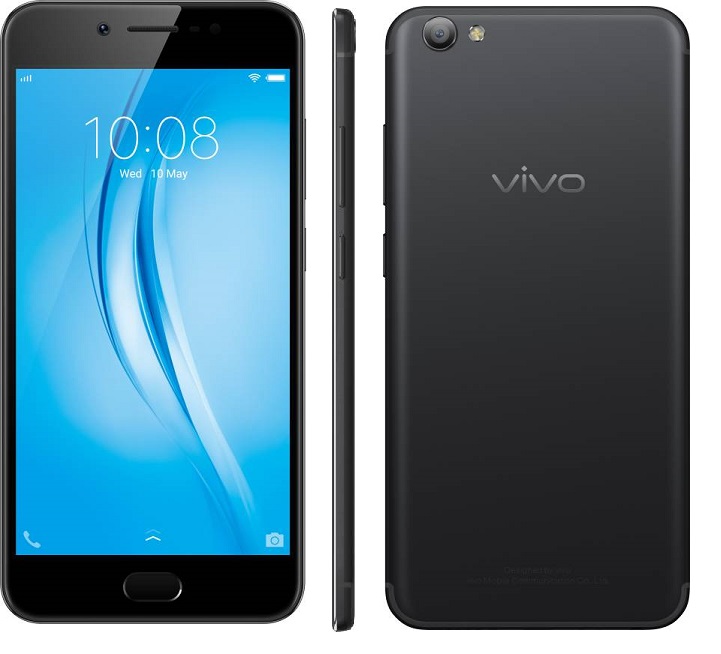
    With the success of Vivo V5 and Vivo V5 Plus smartphones, Vivo has launched one more selfie centric smartphone called as Vivo V5s.  20MP front facing camera with moonlight flash is the main USP of this device. In this post, let us have a quick into Vivo V5s Cons-Reasons for not to Buy according to us.

    Vivo V5s Cons

    Vivo V5s Cons-5 Reasons for not to Buy

    Demerits or disadvantages of Vivo V5s mentioned below are subjective. It is based on the availability of features on other smartphones in the similar price tag.

    • 720p Display panel: Vivo V5s comes with 5.5 inch IPS LCD panel with 1280×720 pixel resolution. Colors, viewing angles, sunlight legibility are good. But overall sharpness with around 267 ppi pixel density not impressive when compared with other 1080p resolution displays on Moto G5 Plus, Redmi Note 4 etc.
    • No Android Nougat Out of the box: Now new smartphones started coming with Android Nougat which is the latest version.  This means that, one need to wait for the updates. It would have been great if it was shipped with Android 7.0 out of the box.
    • Average rear camera performance: Vivo V5s comes with 13MP rear camera with LED flash. In day light conditions it takes decent photos, but in low light and artificial lighting condition performance way below than Moto G5 Plus.
    • Average gaming performance:  Vivo V5s is powered by 1.5 GHz Octa Core MediaTek MT6750 SoC with Mali-T860MP2 GPU and 4GB of RAM. This is the same configuration we have seen on Vivo V5. There was no noticeable lag in basic usages. However, it struggles in gaming sections. Stuttering and frame drops were observed while playing games like Asphalt 8. Casual games performance was decent.
    • Slightly over priced: Vivo V5s is a king when it comes to selfie department. However, when looking into overall performance, Rs.18,990 feels bit over priced.

    These are some of the Vivo V5s cons according to us. Choosing smartphone depends on the user priorities. Knowing the demerits of a device helps to know on what to expect from the device. Please share your thoughts on Vivo V5s in the comment section below.