Category: Smartphones

  • Nexus 5X Tips And Tricks, FAQ

    Nexus 5X is the affordable yet feature rich smartphone. Fast charging, excellant fingerprint scanner, good camera performance, compact size and stock Android experience with timely updates are the key highlights of the new Nexus 5X. Here are the quick tips and tricks on Nexus 5X through which you can make more out of the device.

    LG Nexus 5X

    Recommended Reading:

    Top reasons for not to buy Nexus 5X

    Nexus 5X Tips and Tricks, FAQ

    How to take screenshot on Nexus 5X?

    For taking screenshot, press and hold volume down and power key simultanesly for a second. The screen will blink and screenshot will be taken.

    How to setup Google Now on Tap feature?

    Google Now on Tap is a new features added with Android Marshmallow. It allows google to scan your screen and provide information based on what it finds. For example, if your friends texts about watching a movie, Google now tap will see the movie title and display the show time. Here is the step to enable Google Now on Tap in Nexus 5X.

    • Open the Google app.
    • Go to Settings.
    • In this page tap on Now cards.
    • Make sure Now on Tap is enabled,
    • For using Google Now on tap, just long press the home key.

    How to quickly launch camera app?

    Some times, we need to take spontaneous shots. For that, Nexus 5X comes with few shortcuts which enables you to open camera app quickly even when the phone is in standby mode. If you double tap on power button, the camera app will be opened. If you press on volume down key when the camera app is open, then the photo will be taken.

    How to choose default apps once and all?

    App links is the one more feature added in Android 6.0. This allows you to select the default app to open certain types of links as per your wish.  For doing so, follow the steps given below.

    • Go to Settings > Apps.
    • Tap the gear icon in the upper right.
    • Tap on App links.
    • Choose an app from the list.

    How to use Fingerprintg scanner in Nexus 5X

    With Android 6.0, Fingerprint scanner is natively supported by the system. So add a fingerprints for unlocking the Nexus 5X, follow the steps given below.

    • Go to settings.
    • then Security > Nexus Imprint > Add fingerprint.
    • Create a backup PIN or password
    • Follow the on-screen instructions for scanning your finger.
    • After you’ve added your first finger,  you can add more as well.

    How to fix yellow Nexus 5X screen issue?

    One of the biggest complaint Nexus 5x got is its display. That is display of the device looking too warm or yellow. Though initially Google replaced the devices with yellow display complaint, there was no guarentee that the new device will not have the yellow display issue. But finally, Google has released update to fix the Nexus 5X screen temperature in it new March security patch update(MHC19J). Here is the guide on how to change Nexus 5X screen temperature.

    • First make sure your device is up to date. You check this by going to About phone-> Build number. Here you should see MHC19J.
    • Once you get the latest security patch update, go to settings-> About phone.
    • Now go Enable  Developer Options by repeatedly tapping the build number.
    • Now go to Developer Options in the Settings menu and toggle Cool color temperature.
    • For changes to take place, you need to turn the display off and back on.
  • Xiaomi Redmi Note 3 Cons And Pros Review

    Xiaomi Redmi Note 3 is the latest entrant to the budget Android smartphone. Fingerprint scanner, premium design and build quality and powerful internals at affordable price is the key advantages of this new Redmi Note 3.  It is available in 2 variants. One is 2GB of RAM with 16GB of internal storage and another one is 3GB RAM with 32GB of internal storage. Here is the quick review along Redmi Note 3 Cons and pros.

    Recommended Reading:

    Xiaomi Redmi Note 3 Vs Moto G4 Plus Comparison

    Xiaomi Redmi Note 3 Vs LeEco Le 2 Comparison

    Xiaomi Redmi Note 3 has good all metal design which provides good premium feel to the device. It has 5.5 inch IPS full HD display with narrow bezels. The screen is crisp and vibrant. It offers good color  reproduction and features Xiaomi’s Sunlight Display hardware.

    Redme Note 3

    Xiaomi Redmi Note 3 is powered by 64 bit Qualcomm’s Snapdragon 650 SoC. It is a hexacore SOC which has 2 Cortex-A72 cores running at 1.8GHz and four Coretx-A53s which runs at 1.4GHz.  It has new Adreno 510 for better graphic rendering. The performance on the device is good. In our regular usage, we have not faced any lagging issue. As far as gaming is concerned, it was able to play most of the high end games like Modern Combat 5, Asphalt 8 etc. However, there is minor lag observed while playing Nova 3 game.

    Xiaomi Redmi Note 3 comes with 16-megapixel sensor and a wide f/2.0 aperture. The landscape and macro shots on outdoor conditions came out really well. It captures good details and color accuracy too was good. However, in low light conditions, camera struggles a bit. Video quality on rear is good. But as it lacks stabilization features, captured videos came out shaky. The front facing camera performance in good lighting condition is good.

    Xiaomi Redmi Note 3 has non-removable 4050mAh battery. It provides good battery life. With mobile data enabled all the time, it manages to deliver more than a day of usage. It comes with Qualcomm’s Quick Charge(version 1.0) feature. The connectivity features of the device are Category 7 LTE for Band 3, 5, 40 and 41 along with VoLTE support, dual-band Wi-Fi b/g/n/ac, Bluetooh 4.1, USB OTG, FM radio, Miracast, GLONASS, and BeiDou. It also has IR Blaster.  Redmi Note 3 comes with hybrid dual sim slot.

    Advantages and Disadvantages of Xiaomi Redmi Note 3

    Here are summary of review with Redmi Note 3 cons and pros.

    Pros of Redmi Note 3

    • Good design and build quality.
    • Good performance.
    • Camera performance in outdoor condition is excellant.
    • Good battery life.
    • Decent display screen.

    Cons of Redmi Note 3

    • No Android 6.0 out of the box.
    • No NFC.
    • No optical/ Software stabilization which results in blurry images if there is slight shake while capturing images.
    • Hybrid slim slot: You cannot use microSD card and 2nd sim simultaneously. Also expandable storage is limited to 32GB.

    Xiaomi Redmi Note 3 FAQ, Tips And Trick

    Here are the some of the frequently asked questions about redmi Note 3.

    1.What type of sim card it supports?

    Redmi Note 3 is dual sim Android smartphone. First sim card slot is for micro SIM. The second one is hybrid sim slot. That means, you can either use nano sim card or microSD card.

    2. Does it has Corning Gorilla Glass protection?

    Xiaomi has not mentioned anything about screen protection.

    3. Does it support CDMA sim card in India?

    I have not tested. However, one of my friend on facebook said that, it support CDMA. Below is the screenshot he shared.

    CDMA support in Redmi Note 3

    4. Does Redmi Note 3 support google launcher?

    Yes. It does support

    5.  Does it has notification LED?

    No.

    6.  Is this device support fast charging?

    The device comes with Qualcomm’s Quick Charge(version 1.0). However, it is bit dated technology now. The charging time is around 2 to 2 and half hours.

    7. How to take screenshot on Redmi Note 3?

    The easiest way to take screenshot is through quick setting menu-> Screenshot icon. Another way is through volume down and power button.

    8. Does it has FM radio?

    Yes. It has FM radio.

    9. Does Redmi Note 3 supports USB OTG?

    Yes. It has built in file explorer. Hence out of the box it support USB OTG.

  • Top 5 reasons to buy Samsung Galaxy S7

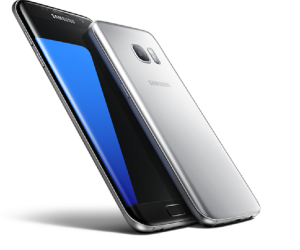
    Samsung has launched its new flagship smartphones Galaxy S7 and Galaxy S7 edge in India. It has many new features and some are improved features over its predecessor. Here is the quick 5 advantages of Galaxy S7 over its predecessor according to us.

    Samsung Galaxy S7

    Top 5 reasons to buy Samsung Galaxy S7

    1. MicroSD card support/ Dual sim support: Last year Samsung has omitted microSD card in its Galaxy S6. However, Samsung has added back the microSD card in its new flagship. Users can now add upto 200GB of microSD card. It is worth mentioning that, Galaxy S7 supports hybrid sim card slot. So, users can add a sim card instead of microSD card. This is a welcome move which enables the user to use dual sim if they don’t want to use memory expansion through microSD card.
    2. Water and Dust Resistant Body

    Samsung Galaxy S7 comes with IP68 rating for water and dust resistance. This means, Galaxy S7 is water resistant to a maximum depth of 1.5 meter for upto 30 minutes.

    3. Always on screen

    Samsung Galaxy S7 comes with a new features called Always on screen. This means that, the screen stays on for all the time and displays basic information like the clock and calendar.

    4. Better camera:

    Samsung Galaxy S7 comes with improved camera. According to the company statement, it can capture better low light photography compared to its predecessor. Also in the camera settings, there is a new option called “Motion Panorama” which allows you to take a panoramic shot that will animate when you scroll over it. This features is very similar to Apple’s Live photos.

    5. Longer battery life:

    Samsung Galaxy S7 comes with larger battery than its predecessor Galaxy S6. As per the company, even with always on screen feature, device is capable of providing complete day of usage with normal usage.

  • Asus Zenfone Android 6.0 Marshmallow Update coming soon

    Asus Zenfone 2 smartphones became very popular because of its value for money offering and user friendly ZenUI. Zenfone Zoom with 3x optical zoom proved technical capability of Asus team. However, sadly, this phone didn’t release with latest Android version Marshmallow. Now, Asus has finally revealed the list of smartphone which are going to get Android 6.0 Marshmallow.

    Which are the Asus Zenfone Variants going to get Android 6.0 Marshmallow?

    Asus has announced the roll out of Android 6.0 Marshmallow update for the users in India for the following Zenfone Variant. For these variants, updates will start rolling out from this month.

    • ZenFone 2 (ZE550ML, ZE551ML)
    • ZenFone 2 Deluxe (ZE551ML)
    • ZenFone 2 Laser ( ZE500KL, ZE550KL, ZE601KL)
    • ZenFone Selfie (ZD551KL)
    • ZenFone Max (ZC550KL)
    • ZenFone Zoom (ZX551ML)

    The new Android 6.0 update will replace three ZenUI apps-ASUS Messenger, ASUS Mail and ASUS Calendar with Google Messenger, Calendar, and Gmail apps as the default apps in Android 6.0 version of ZenUI. Do note that, it will happen if and only if you do factory reset after the update. If you do the factory reset after update and if you want to have ASUS Messenger, ASUS Mail and ASUS Calendar, then you need to download it from Play store.

    The older Zenfones which are not mentioned here also will get Android 6.0 starting from April. However, Asus has not revealed on which are they.

    Google Android 6.0 is largely provides improved performance rather than changes in the design language. The Now on Tap, Doze, ability to use microSD card as internal storage are some key features of this new Android version.

    Android 6.0 introduced with Nexus 5X and Nexus 6p. Then we saw Motorola devices to get the update. Recently  Samsung Galaxy S6, Galaxy S6 Edge,  Sony Xperia Z5 as well started getting Android 6.0 update. So far, Android Marshmallow adoption rate is 1%. It is a welcome move from Asus to provide latest and greatest Android experience to Zenfone users.

  • Xiaomi Mi 4S Features Price and Specification

    Xiaomi has unveiled a new midrange android smartphone called Mi4S. The device will go on sale from 1st March. The price of Xiaomi Mi4S is CNY1699(Approximately Rs.18,000). It will be available in Black, Gold, Purple, and White colour variants.

    Xiaomi Mi4S comes with front and rear glass panels with metal frame for premium look and feel. The device is powered by 2.5GHz  hexa-core Qualcomm Snapdragon 808 paired with Adreno 418 GPU and 3GB of RAM. It comes with 64GB of internal storage and support for microSD card upto 128GB. Mi4s is a dual sim phone and runs on MIUI 7 based on Android 6.0 Marshmallow.

    Mi4S dual sim

    Xiaomi Mi4S sports 5 inch full HD IPS display screen which offers approximately 441ppi pixel density. The connectivity features of the device are 4G LTE, 3G, Wi-Fi 802.11 b/g/n/ac, Bluetooth, GPS, and packs USB Type-C. One of the most teased feature of this device is its fingerprint scanner. This is the first phone from Xiaomi to features fingerprint scanner. It also has Infrared sensor.

    Xiaomi Mi4S houses 13-megapixel rear camera with dual-tone LED flash and PDAF.  For selfie lovers, there is a 5 Mega pixel front facing camera. This handset has 3260mAh non-removable battery and supports Qualcomm’s Quick Charge 2.0 technology. It also supports VoLTE supports.

    Advantages of Xiaomi Mi4S over Mi 4

    • 64 bit Faster processor: (64 bit hexa-core Qualcomm Snapdragon 808 vs 32 bit quad-core Snapdragon 801 processor in Mi4)
    • Fingerprint scanner.
    • Bigger battery with Qualcomm’s Quick Charge 2.0 technology. (3260mAh vs 3080 mAh).
    • MicroSD card support.
    • Android 6.0 based MIUI 7 out of the box.

    At the time of writing this, there is no update on the release date of Mi4S in India. This device will be of the tough competitor for the other midrange smartphones in this price segment.