Author: Aniruddh

  • LeEco Le 1s Eco Launched in India at Rs.10,899

    At an event held in Mumbai, LeEco has launched new variant of Le 1s smartphone in India. It is called as LeEco Le 1s (Eco).  It will come with 1 year subscription for LeEco membership which is priced at Rs. 4,900. The first flash sale of this smartphone will start on 12th May at 2PM via Flipkart. The price of LeEco Le 1s Eco in India is Rs.10,899. However, the first 1,00,000 will be available for a introductory price of Rs.9,999.

    LeEco Le 1s Eco features 5.5 inch full HD(1080×1920 pixel) in cell IPS LCD display with 500-nit brightness and 403 ppi pixel density. It runs on LeEco’s custom EUI based on Android OS. Le 1s Eco is powered by 64-bit octa-core MediaTek Helio X10 SoC clocked at 1.85GHz coupled with 3GB of RAM and PowerVR G6200 GPU.

    Recommended Reading:

    LeEco Le 1s Pros and Cons Review

    LeEco Le 1s top 5 features

    LeEco Le 1s Eco

    LeEco Le 1s Eco comes with 32GB of internal storage. Sadly there is no support for microSD card. However, company introduced LeEco Drive which provides 5TB of cloud storage for every LeEco user. It also features mirror-surfaced fingerprint sensor with a 99.3 percent precision rate.

    LeEco Le 1s Eco sports 13MP primary camera with PDAF that can record video is 4K resolution, along with a 5MP front facing camera. The connectivity features of the device includes 4G, 3G, GPRS/EDGE, Wi-Fi, GPS/AGPS, Bluetooth, Infrared, WLAN, USB OTG, and USB Type-C.  Le 1s Eco has 3000 mAh battery with fast charging support. As per the company statement, 5 minutes of charging will provide 3.5 hours of talk time. It uses USB Type-C port to charge the battery.

    LeEco Le 1s Eco weighs 169 grams and measures 151.1×74.2×7.6mm. The company has said that, now it has 550 service centres in India, and 24/7 live chat in 8 different languages.  LeEco also announced that, Le 1s Eco will support 10 indian languages in an upcoming OTA update. The supported Indian languages will be Assamese, Bengali, Gujarati, Kannada, Malayalam, Marathi, Oriya, Punjabi, Tamil, and Telugu.

    LeEco Le 1s Eco Specification

    • 5.5 inch full HD(1080×1920 pixel) Display
    • 1.85GHz  64-bit octa-core MediaTek Helio X10 SoC with 3GB of RAM and PowerVR G6200 GPU.
    • 32GB of internal storage.
    • mirror-surfaced fingerprint sensor
    • 13MP primary camera and 5MP front facing camera.
    • 3000 mAh battery with fast charging.
  • ASUS Zenfone Go 4.5 2nd Generation-The ‘Go-To’ Budget Offering from ASUS

    ASUS has been known in the smartphone market for being the go-to brand when consumers look for luxury specifications without a price tag that breaks the bank. The latest offering from the company on these lines is the Zenfone Go 4.5 2nd generation.

    Design and Build

    With a metallic hairline finish, the phone, at the first glance itself resembles a premium product. The phone also comes with an ergonomic arc design, managing to be only 3.6 mm at its thinnest edge. This feature, along with the rear key positioning on the phone allows the user to have intuitive one hand control, thus, making it really easy to multitask. The finish on the phone can be attributed to the unique, molding techniques which in turn, has ensured that the phone does not weigh on the heavy side. All of this, has resulted in a phone, which is easy for the user to hold and experience.  The company has further compressed the powerful processor, the dual sim card, and the thin design in such a way, that the form factor of the phone retains its usability quotient. One important aspect of their design is the positioning of the buttons.This has ensured that both, right-handed and left-handed people can use it with equal ease.The phone is also available in a variety of colours to suit your mood and personality.
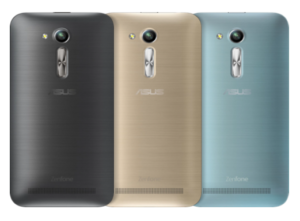
    Zenfone 4.5 Go Design

    Camera

    Coming to the camera specifications on the phone, it comes with a rear camera of 5MP and a front camera of 0.3MP. While the 5MP camera might not look like a big deal to us tech experts used to camera specifications of 13 MP and higher, but for a price tag of just Rs. 5,299 – this camera manages to be very appealing. However, ASUS is also offering users an additional choice, in this category, as there is a second variant of the ZenFone Go 4.5 2nd generation that comes with a rear camera of 8MP and a front camera of 2MP priced at Rs 5,699. This variant would definitely satisfy the clicking enthusiast in you. Apart from this, it’s really the features that come built into the camera that excites the reviewer in me. Along with the ‘PixelMaster’ technology unique to ASUS, also inbuilt into the phone are a total of 16 different modes- be it for clicking pictures during the day or night. The zero shutter lag also ensures perfect photos in a snap.
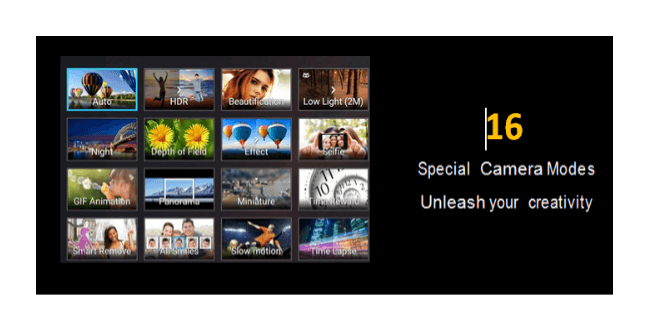
    Zenfone Go 4.5 Camera modes

    Three of the modes that stood out for me were as below-

    Backlight HDR Mode

    This mode reduces the shadow effect and therefore allows the images to have a better brightness and contrast factor by expanding the dynamic range of the shot. The detailing results in flawless images captured- all the time.

    Low Light Mode

    This feature increases the light sensitivity of the image by up to 400%, while reducing the noise and boosting the colour contrast every time. A feature that allows the users to produce clear and bright images in low light as well – this camera is ideal for users who do not wish to worry about the light condition when capturing something they like.

    Beautification Mode

    On your endless selfie clicking rampages, when out with friends, this phone is your perfect companion, as the beautification mode subtly balances the facial features, softens the tones and removes blemishes to make you and your friends look even better. Just when you think that was enough for all your clicking needs, the phone also has built-in MiniMovie application. This application allows users to combine different photos into short movies which can be further made interesting by adding musical notes and text of your choice. Your creations can then be quickly shared through social media, email, cloud services, and YouTube.

    Storage

    Despite being in the budget category, the phone still comes with adequate storage capacity – a 1GB RAM, which ensures that you never have to worry about seeing the dreaded – ‘phone capacity full’ message pop up on your phone. The Zenfone Go 4.5 2nd generation additionally offers 100 GB of accompanying Google Drive storage – that too, free for 2 years! You would have to redeem the offer on the Google Drive app by April 1st, 2018.

    The ASUS ZenUI

    Personally, my favorite aspect on ASUS’ Zenfone range is the ZenUI; it is ASUS’ personalized gift to its users. With a new visual design and features, it allows for classic customization on your phone. The ZenUI is simple, beautiful and brilliant all at the same time. It allows you to have a lock screen accompanied by a customizable font and icon. It has redesigned icons, optional folders, weather and time widgets different, and a variety of ASUS color themes for your use. Further, within the ZenUI, the idea that excites me the most is the ‘ZenMotion’- which allows users to access everything on their phone with just an easy swipe to launch a variety of applications, see notifications of incoming messages, missed calls, and a lot more. It also has a new Boost feature- which acts like your phone’s personal clean up assistant- just by tapping the icon, Boost will clean up background applications to free your phone’s memory and increase its speed.

    ZenUI Launcher

    In particular, for this, one has to simply swipe up on the home screen to access easy customization tools. You can then go ahead and choose your wallpaper, pick your icons and arrange your apps in a moment.
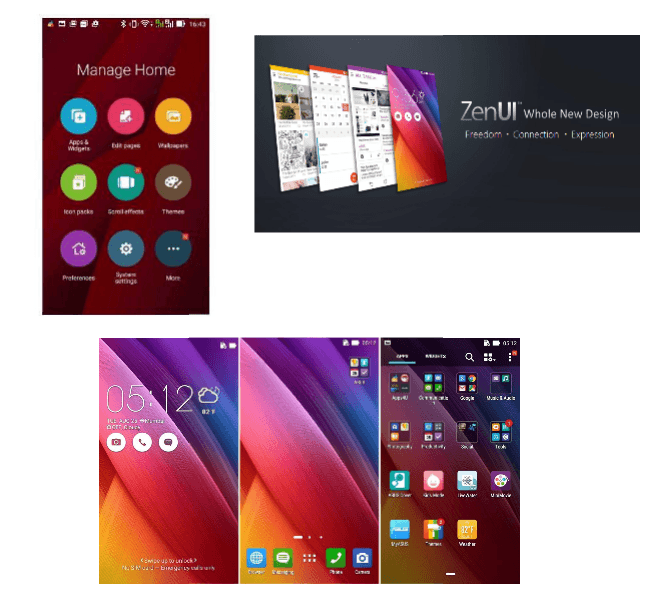
    Asus Zenfone Go 2nd Gen

    Performance

    The phone matches your needs of smart and quick performance at every step with its Qualcomm quad core CPU@1.2GHz, and dual sim-dual standby feature. Additionally, the Sonic-Master Technology delivers crystal clear sound to your ears, satisfying the music-lover in you. The phone is also probably more obsessive than you, about conserving power especially when searching for a signal, thus significantly increasing its standby time. It has an advanced antenna design that ensures fantastic performance, even in areas with poor signal. Be it for your social media needs, or your routine daily tasks, the phone has adequate capability built into it, to offer a power-packed performance.
    To conclude- this phone is perfect for those users that look for class, appeal and performance, without burning a hole in their pocket. The variant with the 0.3MP/5MP (front + rear) camera being priced at just Rs. 5,299, and the 2MP/8MP (front + rear) camera at INR 5,699; it can literally be the ‘Go-To’ phones for the budget smartphone section and is bound to make heads turn when you take it out in public. With multiple features on it, that still do not compromise on build, aesthetic or specifications quality, the Zenfone Go 4.5 2nd generation does all that and more, acting like the ultimate ‘Zen’ companion to your fast paced life.

    Noise Cancellation:

    Zenfone 4.5

    We live in a world that is noisy all the time, and to reflect on that real time experience, ASUS has come up with the NoiseTalk Zero which is an innovative combination of linear-echo-cancellation (LEC) and noise-suppression (NS) that works towards wiping out audio rebound and in reducing background noise to a minimum. In fact, the Zenfone’s LEC is 1.2X (20%) better at blocking echoes and is 2.3X (130%) more effective at noise suppression in multiple environments comparatively. As a result, users get the chance to experience crystal-clear quality during their calls.


  • How to create automatically changing wallpaper slideshow in Ubuntu

    Ubuntu 16.04 LTS comes with lot of new features and functionality. It is fast and more user friendly now. In this post we will have look into Ubuntu trick which helps user to create automatically changing wallpaper slideshow. This works even with older version of Ubuntu.

    How to create automatically changing wallpaper slideshow in Ubuntu

    If you are a Windows user, you might have already know about themes which automatically changes wallpapers. So you might be wondering is there is any simple way to create automatically changing wallpaper in Ubuntu using the images coming from a pictures folder, or pre-selected folder with pre selected time?

    Recommended reading:

    Ubuntu 16.04 Tips and Tricks

    There are many custom programs which helps you to do the same. However, if you don’t want install any other application and perform  automatically changing wallpaper in Ubuntu, there is a way. You can use pre installed photo manager called shotwell.

    How to create automatically changing wallpaper slideshow in Ubuntu using Shotwell Photo Manager

    • First you need to import the photos which you want to the  Shotwell Photo Manager.
    • You can do that by going to File->Import from Folder. Browse the folder where you have saved  photos which you want to set as slideshow.
    • Now select the photos which you want to add it to the slideshow of wallpapers in Ubuntu.
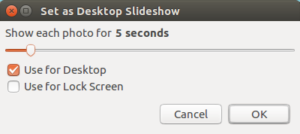
    • Go to File->Set as Desktop Slideshow.

    Wallpaper Slideshow in Ubuntu

    • You customize time period for the images to change by moving the slideshow to the left or right. The minimum time you can set for changing the wallpaper is 5 sec and maximum 1 day.
    • You can also set this for lock screen as well.

    As mentioned before, it is one of the way to set automatically changing wallpaper on Ubuntu on desktop and on lock screen. It is the simplest method because it does not need any additional programs or software. Shotwell photo manager is pre installed program on Ubuntu.

  • Ubuntu 16.04 Tips Tricks and FAQ

    The much awaited Ubuntu 16.04(‘Xenial Xerus’) is launched now and available for the users. You can directly update from  previous version or you can perform clean install of new version by directly downloading from the official page. Here are the some of the useful tips and tricks on Ubuntu 16.04.

    Ubuntu 16.04 Tips Tricks and FAQ

    How to create bootable USB pendrive or USB stick for Ubuntu 16.04 in Windows 10?

    There are multiple ways through which you can create bootable Ubuntu USB drive on Windows. The simplest one which I came across is using the Win32 Disk Imager application. It provides graphical interface.

    Ubuntu Live USB stick creator

    • First download the Ubuntu 16.04 ISO image file.
    • Download  Win32 Disk Imager application. You can download it from here.
    • Insert your USB stick.
    • Note the drive letter assigned to your flash media.
    • Start Disk Imager.
    • Select the downloaded file and target device, and click “Write”.
    • Remove your flash media when the operation is complete.

    How to install Google Chrome in Ubuntu 16.04?

    You can download the latest Google Chrome for Ubuntu 16.04 from the official download page from here.

    Unable to install Google Chrome on Ubuntu 16.04. How to fix it?

    One of the way to fix error in installing Google chrome in Ubuntu 16.04 is by fixing the broken package through terminal.

    • Download the Google Chrome linux variant.
    • Now open the terminal.Shortcut to open terminal is Ctrl+Alt+t.
    • Now go to the folder in which you have downloaded the Chrome. By default it is Downloads folder.
    • If you have saved the chrome installation file in downloads folder, then type “cd Downloads”. Hit   Enter on keyboard.
    • Now type “ls”.
    • It will show all the files in the folder Downloads.
    • Copy the full file name of chrome installation file.
    • Now type “sudo dpkg -i google-chrome-stable_current_amd64.deb”. (Here google-chrome-stable_current_amd64.deb is the file name. You can change the file name according to the file name you have given.)
    • It will install the google chrome. If you find any error related to broken packages, then type the following.
    • sudo apt-get -f install.
    • Now once again execute “sudo dpkg -i google-chrome-stable_current_amd64.deb”.
    • It will be installed now.

    How to move unity launcher to the bottom of the screen in Ubuntu 16.04?

    You can move the Unity launcher to bottom of the screen and use as dock style launcher by following the steps given below.

    • Open the terminal(Ctrl+Alt+T).
    • Type “gsettings set com.canonical.Unity.Launcher launcher-position Bottom”

    Unable to view Kannada fonts on Ubuntu 16.04? How to fix this?

    If you are facing issue in rendering Kannada fonts in Ubuntu 16.04, follow the steps given below. It will also fix the Kannada font rendering issue in Chrome and Firefox browser as well.

    • Open Terminal
    • Type sudo apt-get install fonts-lohit-knda fonts-knda.
    • It will install all the required kannada fonts in Ubuntu 16.04. Now you will be able see the kannada fonts.

    How to create automatically changing wallpaper in Ubuntu 16.04?

    If you want to create a slideshow of your photos as your wallpaper, you can use “Shotwell” application. This is  installed by default.

    • Open the Shotwell.
    • Import the photos which you want to add it to the slideshow.
    • Select the photos you want in the slideshow.
    • Now Go to File → Set as Desktop Slideshow or press Ctrl+B.
    • Adjust time settings for the duration for each photos to show up.

    You can read more detailed post on this in my old post How to create automatically changing wallpaper in Ubuntu.

    How to fix booting issue of Ubuntu 16.04 after installing windows 10 or Vice versa?

    There is a simple tool called Boot repair which comes handy. It can repair frequent boot issues you may encounter in Ubuntu like when you can’t boot Ubuntu after installing Windows or another Linux distribution, or when you can’t boot Windows after installing Ubuntu, or when GRUB is not displayed anymore, some upgrade breaks GRUB, etc. I have written a detailed post on this. You can read more on this here How to Fix Windows Booting Issue after Installing Ubuntu Or Vice Versa.

    How to take screenshot on Ubuntu 16.04?

    Capturing print screen on Ubuntu 16.04 is very easy. You have a programme called screenshot. Open application. You have the option capture whole screen or certain portion of screen or only active screen. There is a option to take screenshot with time delay.

  • Asus unveils new lineup of ROG gaming laptops and Desktops in India

    Asus has launched six new gaming computers under its ROG (Republic of Gamers) series in India. The newly launched devices includes four notebooks and two new gaming PC’s. The price of these new ROG lineup starts from Rs.82,490.

    Asus ROG gaming laptop

    New ROG Gaming laptops Features and Price

    The newly launched gaming laptops are ROG G501VW, ROG G551VW, ROG G752VY and ROG GL552VW.

    Asus ROG GL552VW

    This is an entry level gaming laptop in the latest ROG series. In terms of looks it follows the ROG design theme. According to Asus,  ROG GL552VW  design is inspired by F22 Stealth fighter aircraft. It has got all new metallic design with a backlit ROG logo. It is powered by quad core sixth gen Intel core i7 Skylake processor, Nvidia GTX960M GPU, 4GB GDDR5 graphics memory, 16GB system memory and 1TB of storage with 128GB SSD. The price of Asus ROG GL552VW in India is Rs. 82.490.

    Asus ROG G501VW

    This new Windows 10 gaming laptop is designed for the users who need powerful internals in a portable and lightweight form factor. It is 20.6mm thick and weighs just 2.06kg. It has got 4K IPS panel display screen with 178-degree viewing angles. The audio experience is powered by Asus Sonic Master and ROG Audio Wizard.

    Asus ROG G501VW gaming laptop is powered by NVidia GTX 960M graphics with blazing fast 4GB GDDR5 graphics memory, 16GB ultrafast DDR4 system memory and up to a next gen 512GB PCIe Gen 3×4 SSD giving you speeds upto 2Gbits/s.

    Price of Asus ROG G501VW in India is Rs.95,490.

    Asus ROG G551VW

    ROG GL552VW Gaming Laptop

    It is a High-performance gaming laptop with enthusiastgrade graphics and silent cooling system. It engrosses players in the game through its 4K IPS panel with 178-degree viewing angles, complemented by ASUS SonicMaster and ROG AudioWizard enhanced audio. Its efficient thermal management system works silently in the background to give you uninterrupted marathon gaming sessions. The G551VW is power packed with NVidia GTX 960M graphics with blazing fast 4GB GDDR5 graphics memory, 16GB ultrafast system memory, a 1TB of storage along with 128 GB SSD.

    Asus ROG G551VW price in India is Rs.1,00,490.

    Asus ROG G7552VY

    This is the flagship model of ROG series line up. It comes with a revolutionary design finished in a new Armor Titanium and Plasma Copper color scheme. With Windows 10, a 6th-generation Intel Skylake Core  i7 processor, up to 64GB DDR4 RAM, and the latest NVIDIA GeForce  GTX 980m graphics, ROG G752 delivers exceptional gaming performance. It even features the ROG-exclusive mobile 3D Vapor Chamber for increased cooling performance, and a backlit anti-ghosting gaming keyboard with 30-key rollover for precise command and control in battle.

    New ROG Gaming Desktop Features and Price

    ROG GT51 Gaming Desktop

    Asus ROG GT51 Gaming Desktop

    This model has won the 2016 CES Innovation Award in the Gaming and Virtual Reality category. This gaming desktop is powered by 6th-generation Intel Core i7-6700K processor and supports up to NVIDIA GeForce GTX TITAN X (2-way SLI) for the performance to run games across three 4K monitors. ROG Turbo Gear lets users maximize GT51’s full overclocking potential with just one click, while the ASUS-exclusive Aegis II application helps monitor system parameters. In addition, a USB 3.1 Type-C port on its front panel provides data transmission speeds of up to 10Gbps and is able to quick-charge mobile devices. GT51 features the exclusive ROG Band to let users activate Shadow Drive — a hidden hard drive space — or overclock GT51 as well. GT51 has an internal cooling system with a dedicated air tunnel that takes advantage of natural convection to ensure efficient heat management during marathon gaming sessions. It has an aggressively designed ATX chassis with an Armor Titanium and Plasma Copper finish, a transparent side window, and customizable lighting effects that showcase up to 8 million colors.

    The price of Asus ROG GT51 starts at Rs.3,25,900

    Asus ROG G20CB Gaming Desktop

    It is a powerful compact, console-sized 9.5-liter gaming desktop with refined aesthetics. Along with 2.5” and 3.5” slots for SSDs and HDDs, the G20 supports the latest M.2 PCIeGen 3×4 SSD which gives you data access speed of up to 2Gbits/s, — four times faster than SATA SSDs. With up to an NVidia GTX 980, the G20 is suited for surround displays or for 2K or 4K monitors. It also includes exclusive ASUS ROG Aegis II software with GameAlive for instant gameplay recording, editing, and streaming, and GameFirst III for network traffic management.

    The price of Asus ROG G20CB starts at Rs.1,22,990.