

Author: Aniruddh

  • MediaTek Showcases AI and Camera Innovations Across Its Flagship Dimensity Portfolio at Tech Day 2025

    Bengaluru, December 20, 2025 — MediaTek, the world’s leading fabless semiconductor company powering nearly 2 billion connected devices annually, hosted its MediaTek Tech Day 2025 in Bengaluru. The event highlighted the company’s latest breakthroughs in AI, mobile imaging, gaming, and power-efficient computing, with a strong focus on its premium and flagship Dimensity chipset lineup.

    Themed “Innovation, possibilities, and imagination in every chip,” the event brought together media representatives, technology analysts, and key retail partners including OPPO and vivo, offering a closer look at how MediaTek is shaping the next generation of smart devices.


    Dimensity 9500: MediaTek Raises the Bar for Flagship Performance

    At the heart of the showcase was the MediaTek Dimensity 9500, the company’s most advanced mobile SoC to date. Designed for flagship smartphones, the Dimensity 9500 reinforces MediaTek’s leadership in high-performance mobile computing.

    Key highlights of the Dimensity 9500 include:

    • Third-generation All Big Core CPU architecture
    • A powerful 4.21GHz ultra core
    • Industry-first 4-channel UFS 4.1 support for faster storage performance
    • MediaTek Imagiq 1190 ISP for next-level camera and imaging capabilities
    • Arm Mali G1-Ultra GPU delivering console-grade gaming
    • Optimised performance cores for better efficiency and sustained workloads

    Together, these advancements enable on-device AI processing, superior photography, immersive gaming, and longer battery life — all without compromising performance.


    Flagship Smartphones Powered by MediaTek Dimensity

    MediaTek also spotlighted its growing ecosystem of flagship and premium smartphones powered by Dimensity chipsets. This includes upcoming and existing devices from leading OEMs such as:

    • OPPO Find X9 series
    • vivo X300 series
    • Premium smartphones built on the Dimensity 8000 series

    The Dimensity flagship family now spans multiple high-end SoCs, including:

    • Dimensity 9500
    • Dimensity 9400+
    • Dimensity 9400
    • Dimensity 9400e
    • Dimensity 9300+

    This wide portfolio allows manufacturers to deliver cutting-edge experiences across different price segments, especially in performance-focused and camera-centric smartphones.


    AI, Imaging, and the Future of Smartphone Photography

    A major highlight of MediaTek Tech Day 2025 was a panel discussion titled
    “Chipset Intelligence at the Core of Tomorrow’s Photography and Imaging Experiences.”
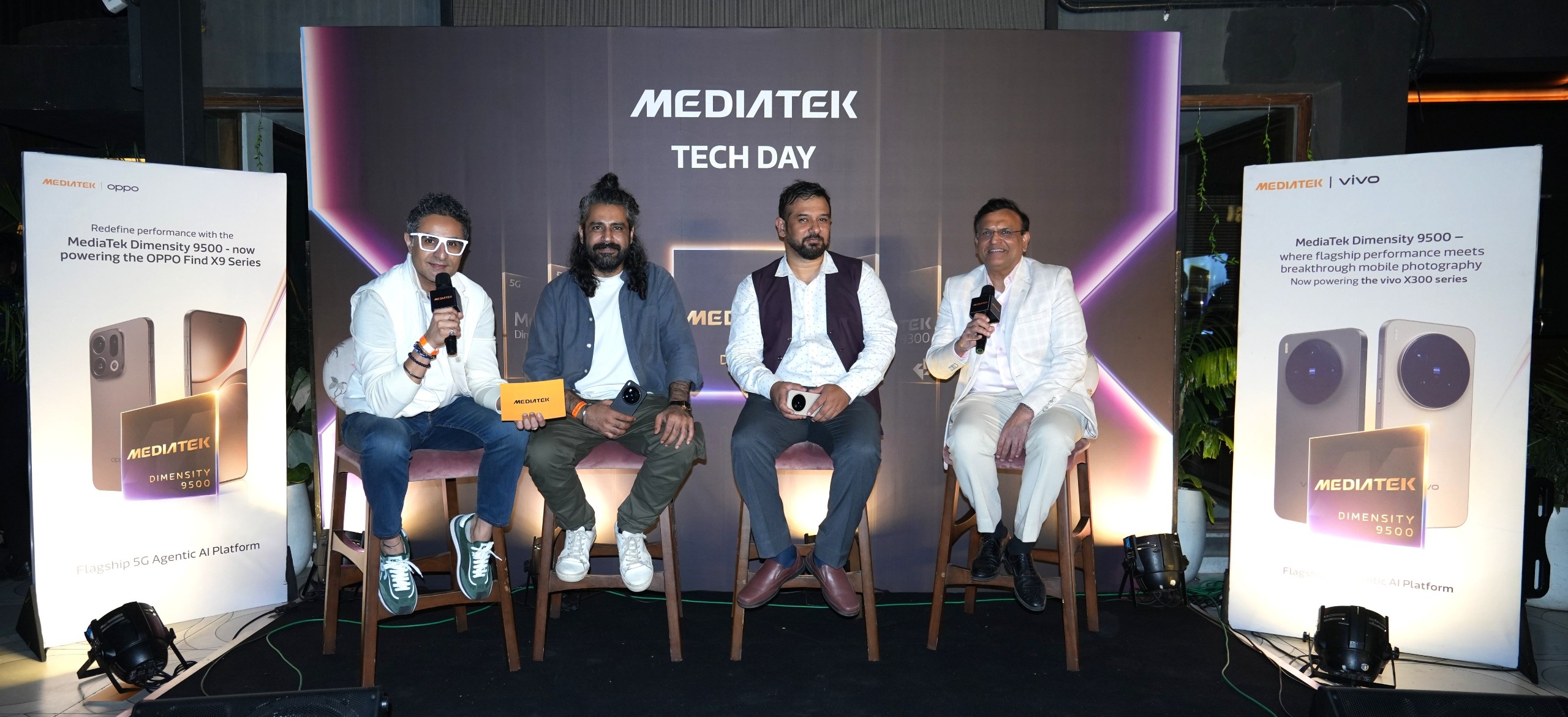
    Moderated by Anuj Sidharth, Director of Marketing and Communication (India & SEA), MediaTek India, the panel featured:

    • Anku Jain, Managing Director, MediaTek India
    • Faisal Kawoosa, Chief Analyst, Techarc
    • Aman Chotani, Professional Photographer

    The discussion explored how advanced chipsets are redefining smartphone photography, enabling smarter AI-powered imaging, faster processing, and better real-world performance.

    Faisal Kawoosa noted that flagship smartphones are moving beyond raw specifications, with processors now playing the most critical role in user experience — influencing camera quality, gaming, efficiency, and long-term reliability. He highlighted MediaTek’s Dimensity portfolio, particularly the Dimensity 9400 series, for delivering an effective balance between performance, efficiency, and optimisation at scale.


    India: A Strategic Market and Innovation Hub for MediaTek

    Speaking on the sidelines of the event, Anku Jain, Managing Director of MediaTek India, emphasised the company’s long-term commitment to the Indian market.

    MediaTek continues to expand its R&D capabilities in India, focusing on secure, energy-efficient, and innovative technologies that meet the needs of an increasingly digital-first population. India also plays a key role as a talent and innovation hub, supporting MediaTek’s global product roadmap.

    Anuj Sidharth further added that MediaTek’s leadership as the world’s top mobile SoC provider is enabling the next wave of intelligent, on-device AI experiences, with the Dimensity 9500 positioned as a major breakthrough in AI, camera performance, and efficiency.


    Beyond Smartphones: MediaTek’s Expanding Ecosystem

    In addition to mobile chipsets, MediaTek showcased its leadership across multiple smart device categories, including:

    • Smart TVs
    • Smart speakers
    • Wi-Fi routers
    • ARM-based Chromebooks
    • Smart projectors like the Lumio Arc 5 and Arc 7
    • Smart home and IoT devices

    The company also shared insights into emerging consumer technology trends for 2026, highlighting how advancements in AI, connectivity, and smart devices will redefine everyday digital experiences.


    Conclusion: Powering the Next Era of Intelligent Devices

    MediaTek Tech Day 2025 underlined the company’s mission to make advanced technology more accessible, impactful, and energy-efficient. With innovations like the Dimensity 9500, MediaTek is not only pushing the boundaries of mobile performance but also shaping the future of AI-driven, camera-centric, and connected experiences across devices.

    As smartphones and smart devices continue to evolve, MediaTek’s expanding Dimensity portfolio positions it firmly at the centre of the next wave of innovation — delivering smarter technology that seamlessly enhances everyday life.
  • Skip or Buy? Samsung Galaxy M36 5G Review After 15 Days of Use

    I’ve been using the Samsung Galaxy M36 5G as my daily driver for about 15 days, and this is my completely honest, real-world experience. If you are considering buying this phone, this review should help you make a crystal-clear decision.

    ✅ Top 5 Advantages (Pros) of the Samsung Galaxy M36 5G

    1. The Stellar Super AMOLED+ Display with 120Hz

    The display is undoubtedly the biggest highlight of the M36. Colors look bright, punchy, and incredibly natural. Even when battling harsh outdoor sunlight, the screen remains perfectly visible. Whether you’re watching videos, reading, or just scrolling, the visual experience genuinely feels premium and responsive.

    2. Smooth One UI and Unmatched Software Support

    Samsung’s One UI has been smooth and well-organized throughout my usage. What truly sets this phone apart is Samsung’s commitment: promising a remarkable 6 years of long-term software updates. This longevity is a massive advantage that adds substantial value to your purchase.

    3. Excellent Performance for Daily Tasks

    For standard daily usage—calls, WhatsApp, web browsing, banking apps, and light multitasking—the M36 performs flawlessly. I experienced no noticeable lag in regular use. While it’s not built for intense gaming, it handles the everyday workload with impressive speed and stability.

    4. Reliable All-Day Battery Backup

    The 5000 mAh battery delivers reliable stamina. With moderate usage, it easily lasts a full day. If you are a light user, you can certainly stretch it well into the second day. Samsung’s battery optimization is highly effective here.

    5. Decent Daylight Camera with OIS

    The main 50MP camera performs reliably during the day. Photos captured in good light show natural colors, and the inclusion of OIS (Optical Image Stabilization) helps deliver quite decent video stabilization. For casual outdoor photos and videos, the camera holds up well.

    ❌ 5 Key Disadvantages of the Samsung Galaxy M36 5G

    1. Outdated Front Design (The Waterdrop Notch)

    This is a notable aesthetic drawback. The waterdrop notch (U-notch) instantly gives the phone an older appearance. In 2025, a modern punch-hole design has become standard even in budget phones, so seeing this older design on the M36 is a slight disappointment.

    2. Lack of Stereo Sound (Mono Speaker)

    The audio experience is strictly average. There is no stereo sound, and the single bottom-firing speaker lacks immersion. If you frequently watch videos or listen to music without headphones, you will immediately notice this significant limitation.

    3. Slow 25W Charging & No Charger in the Box

    This is arguably the biggest frustration point.

    These two factors combined substantially increase the overall cost and the time spent waiting for a full charge.

    Charging is limited to 25W, which feels genuinely slow when compared to competitors in this price segment.

    More annoyingly, there is no charger included in the box, forcing you to purchase a compatible one separately.

    4. Average Low-Light Camera Performance

    While daytime results are decent, the camera struggles significantly after sunset. Night shots quickly lose detail and appear soft, and highlights tend to be easily blown out. The front camera also falters in low-light conditions. If night photography is a priority, this phone will disappoint.

    5. Not Suitable for Power Users

    If your usage involves heavy multitasking, continuous data use, or resource-intensive apps, you will find the battery drains faster than desired. Combined with the slow charging speed, the M36 is not an ideal device for power users or frequent travelers who need rapid battery top-ups.


    🎯 Final Verdict: Who Should and Shouldn’t Buy It?

    ✔️ Who Should Consider Buying the M36 5G?

    • You prioritize Samsung’s stunning Super AMOLED+ display.
    • You want a clean UI and unmatched long-term software support (6 years).
    • You need a reliable phone mainly for everyday tasks.
    • You prioritize brand trust and after-sales service.
    • You mainly take photos in good daylight conditions.

    ❌ Who Should Avoid It?

    • You expect fast charging and/or a charger included in the box.
    • You demand a modern, premium punch-hole design.
    • You are an avid photographer who takes a lot of low-light photos.
    • You want an immersive media experience with stereo speakers.
    • You are a heavy user who needs rapid, on-the-go charging.

  • HP India Launches New High-Speed Laser M300 Series Printers for SMBs and Enterprises

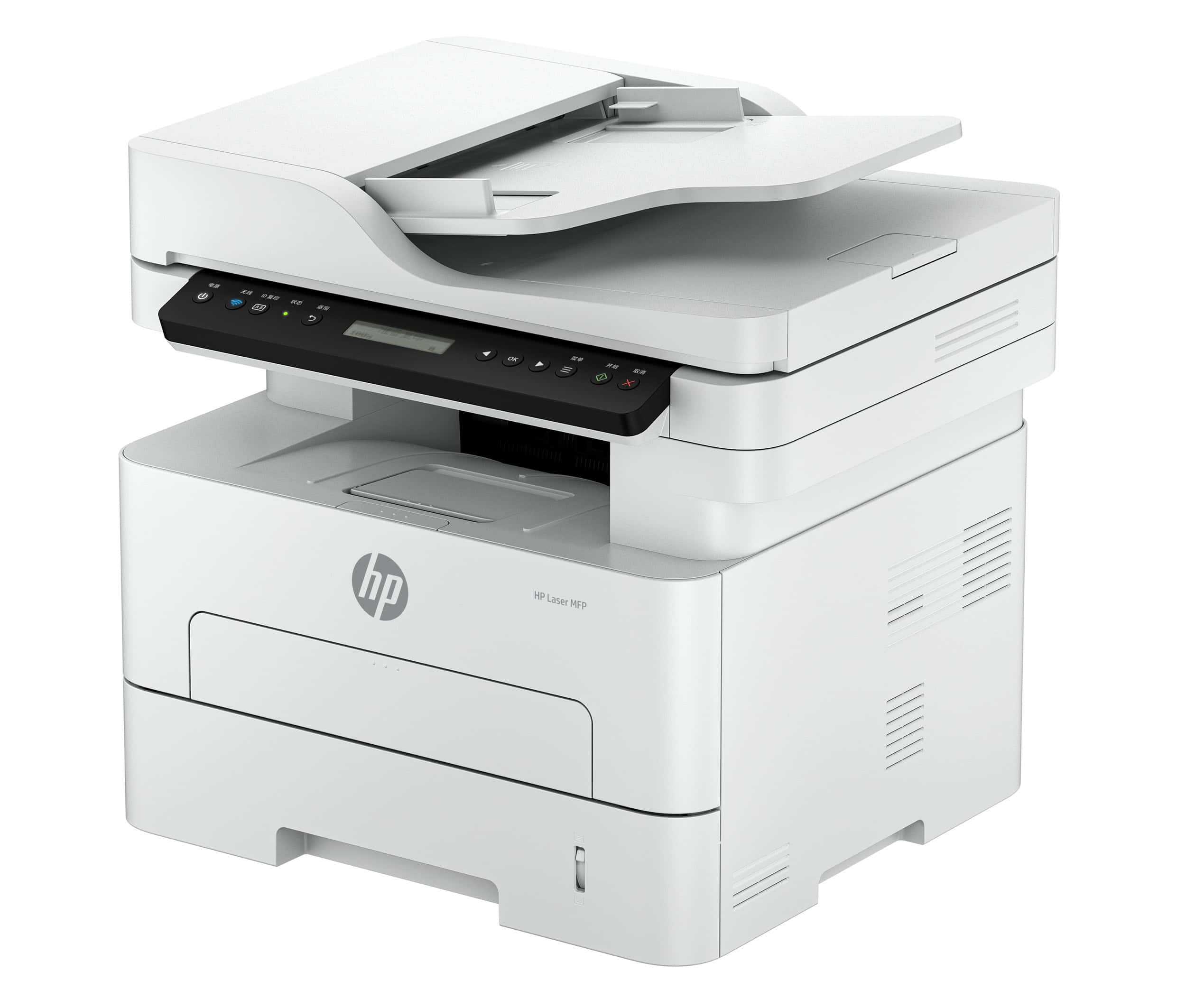
    HP India has expanded its Laser M300 Series with three new models—HP Laser 335dn, HP Laser 335dw, and HP Laser MFP 355sdnw—designed for fast-growing SMBs, print shops, and enterprises. The new printers offer 33 ppm auto-duplex printing, lower running costs, and a compact, energy-efficient design ideal for Indian businesses.

    Key Features of the New HP Laser M300 Series

    1. High-Speed, High-Volume Performance

    • Up to 33 ppm (A4) printing
    • Automatic duplex printing across all models
    • 8.5-second first-page-out time
    • 600 MHz processor + 256 MB memory
    • 250-sheet input tray for large print jobs

    2. New Separate Drum & Toner System

    HP introduces its first separate drum and toner system in the A4 commercial segment:

    • HP 181A/181X toners: up to 3,000 pages
    • HP 181A imaging drum: up to 10,000 pages
    • Lower cost per page and reduced downtime

    3. Smart, Connected Printing

    • Wireless and Ethernet (335dw & 355sdnw)
    • Mobile printing support via HP App
    • 40-sheet ADF on MFP 355sdnw for easy scanning and copying
    • Space-saving all-white design

    4. Sustainable & Energy Efficient

    • Made with 20% recycled plastic
    • Certified for energy efficiency

    Price and Availability in India

    Available on the HP eStore:

    • HP Laser 335dn – ₹24,000
    • HP Laser 335dw – ₹25,500
    • HP Laser MFP 355sdnw – ₹37,875

    Conclusion

    The new HP Laser M300 Series delivers faster printing, lower operating costs, and modern connectivity—making it one of the best laser printer choices for SMBs, enterprises, and print shops in India.

  • 3 EASY Ways to Screenshot on iPhone 17 and iPhone 17 Pro

    Looking for the best ways to quickly capture your screen on the new iPhone 17 or iPhone 17 Pro? 🤔 You’ve come to the right place!

    While the traditional button method is reliable, your new iPhone offers a couple of incredibly convenient alternatives you might not know about. In this quick guide, we’ll walk you through three simple and effective methods for taking a screenshot on your latest iPhone model.

    Recommended Posts:

    How to turn off iPhone 17/17 Pro

    Set custom ringtone on iPhone 17/17 Pro

    Here are the three ways you can take a screenshot on the iPhone 17/17 Pro:

    Method 1: The Classic Hardware Button Combo

    This is the most well-known and fastest method, using your iPhone’s physical buttons.

    1. Locate the Buttons: Find the Volume Up button (on the right side) and the Side button (on the left side) of your iPhone.
    2. Press Simultaneously: Quickly press both buttons together and then release them.
    3. Review the Capture: A small preview of the screenshot will appear in the bottom-left corner. You can tap it to crop, edit, or just wait a moment for it to save automatically to your Photos app.

    Method 2: The Magic of Back Tap (One-Time Setup Required)

    The Back Tap feature is a hidden gem in the Accessibility settings that lets you assign a shortcut (like taking a screenshot) to a simple double-tap on the back of your phone.

    One-Time Setup:

    1. Go to Settings.
    2. Scroll down and tap Accessibility.
    3. Go inside Touch.
    4. Scroll down to the bottom and tap Back Tap.
    5. Select Double Tap (or Triple Tap, if you prefer).
    6. From the list of actions, scroll down and select “Screenshot.”

    Future Use:

    Once set up, simply double-tap the very back of your iPhone 17 (even with a case on!) to instantly capture the screen. No need to fumble for buttons!


    Method 3: The Easiest Way – Just Ask Siri!

    For a completely hands-free method, you can simply ask your digital assistant to do the work.

    1. Launch Siri: Activate Siri using the “Hey Siri” command or by pressing and holding the Side button.
    2. Give the Command: Say, “Screenshot.

    Siri will instantly capture the image and save it to your Photos app. This is the easiest method if your hands are full or you prefer voice commands.


    Whether you prefer the traditional button combo, the super-convenient “Back Tap” feature, or simply asking Siri, your iPhone 17/17 Pro gives you plenty of options for capturing those important moments on your screen.


    We hope this quick tutorial was helpful! For more tips and tricks on getting the most out of your new device, keep an eye on our latest guides!

  • How to Change and Set Custom Ringtones on iPhone 17 (or Pro)

    Tired of the default “Radar” chime? Your iPhone 17 (or 17 Pro) offers easy ways to personalize its sounds. Whether you want to pick a different classic tone or use your favorite song, we’ll walk you through the steps.

    Recommended Reading:

    How to turn off iPhone 17 or iPhone 17 Pro

    3 Ways to screenshot on iPhone 17/17Pro/17Promax

    How to Change ringtone on iPhone 17, iPhone 17 Pro and iPhone 17 Pro Max

    Changing to a Pre-Installed Ringtone

    Switching to one of Apple’s built-in ringtones is quick and easy:

    1. Open the Settings app.
    2. Scroll down and tap Sounds & Haptics.
    3. Tap on Ringtone.
    4. You’ll see a list of pre-installed ringtones .
    5. Simply tap the one you want to preview it and set it as your new ringtone.

    That’s all there is to it!

    Setting a Custom Ringtone on iPhone 17 Pro

    Thanks to iOS 26, using a custom song for your ringtone is easier than ever, though there are a few important steps to follow first.

    Prepare Your Audio File

    Your custom ringtone must be an audio file that is 30 seconds or less in length.

    • If you have a longer song, you’ll need to use an audio editor (either on your phone or computer) to trim it down to the right length.
    • You can acquire audio files by downloading them directly from the web using Safari or transferring them from another device to your iPhone.

    Set the Custom Ringtone

    Once your audio file is saved on your device, follow these steps:

    1. Open the Files app and navigate to the folder where you saved your custom ringtone audio.
    2. Tap and hold on the audio file’s name.
    3. From the pop-up menu, select Share.
    4. In the share sheet that appears, look for and tap the option that says Use as Ringtone. Your selected file is now your new default ringtone!

    Removing a Custom Ringtone

    If you decide you don’t want to use a custom ringtone anymore, deleting it is simple:

    1. Go back to Settings > Sounds & Haptics > Ringtone.
    2. Find your custom ringtone in the list.
    3. Swipe left on the ringtone’s name.
    4. Tap the Delete button that appears.

    Now you know how to fully customize your iPhone’s incoming calls! What song are you thinking of setting as your new custom ringtone?