Confused about how to turn off your new Samsung Galaxy S26 Ultra? You aren’t alone. By default, pressing and holding the side button triggers the Gemini digital assistant instead of the power menu. Whether you want to restart your device or completely shut it down, here are the three fastest ways to do it.
Watch the Video Guide:
Method 1: The Button Combination (Quickest Way)
The most common way to access the power menu is by using the physical hardware buttons.
Simultaneously press and hold the Volume Down button and the Side (Power) Button for about one second.
The power menu will appear on your screen. Tap Power Off or Restart.
Method 2: Use the Quick Settings Panel
If you prefer not to use physical buttons, you can use the software shortcut.
Swipe down from the top-right corner of your screen to open the Quick Panel.
Locate the Power Icon at the top right (near the Settings gear).
Tap the icon to bring up the power options.
Method 3: Remap the Side Key (Permanent Fix)
If you want the side button to act like a traditional power button again, follow these steps to remap it:
Swipe down the Quick Panel and tap the Power Icon.
Select Side button settings at the bottom.
Under the “Press and hold” section, change the selection from “Digital Assistant” (Gemini) to “Power off menu.”
Now, whenever you long-press the side key, your Galaxy S26 Ultra will show the power menu directly!
Which Galaxy Models Does This Work For?
These steps are identical for the entire S26 lineup:
Samsung Galaxy S26
Samsung Galaxy S26 Plus
Samsung Galaxy S26 Ultra
Final Thoughts
Samsung’s shift toward digital assistants can make simple tasks like restarting your phone feel complicated, but these shortcuts make it easy. For more practical tech guides and Galaxy S26 Ultra tips, stay tuned to tech2touch.com.
Don’t forget to subscribe to our YouTube channel for more visual guides!
Let’s be honest: the weather isn’t exactly playing fair lately. Whether you’re a motorcyclist melting on the asphalt, a trekker facing unpredictable mountain chills, or a professional working long shifts under a relentless sun, “powering through” is getting harder.
Traditional solutions—like bulky ice packs that melt in an hour or fans that just blow hot air around—are officially outdated. Today, India-based tech pioneer CHILTIER just changed the game with the launch of the Hydro Vest.
It’s not just a piece of clothing; it’s a wearable climate-control system designed to give you total mastery over your environment.
The Science of Comfort: How It Works
The Hydro Vest moves away from passive cooling and introduces active, intelligent thermal management. Using advanced Peltier-based thermoelectric technology, the vest doesn’t just “feel” cool—it actively removes heat from your body (or adds it) via a closed-loop liquid circulation system.
Think of it as a high-tech radiator for your torso. Thermally conductive tubing integrated into the lining stabilizes your core temperature, reducing fatigue and boosting endurance when the elements are against you.
Two Models, Zero Compromises
CHILTIER knows that a biker’s needs are different from a hiker’s. That’s why they’ve launched two distinct configurations:
Feature
The X1 Model
The Z1 Model
Best For
Motorcyclists & Drivers
Outdoor Pros & Adventurers
Power Source
Vehicle-connected (12V)
Portable Battery Backpack
Run-time
Unlimited
Up to 8 Hours
Weight
~700 grams
~700 grams
Noise Level
Ultra-quiet (<20 dB)
Ultra-quiet (<20 dB)
Why This is a Game Changer
Precision Control: Adjust your temperature between 10°C and 40°C via a mobile app.
Featherlight Design: At just 700g, it’s lighter than most hydration packs.
Built for Extremes: It’s water-resistant and rugged enough for the toughest outdoor work shifts.
Sustainable Tech: Engineered without harmful refrigerants and designed for long-term repairability.
“Our vision at CHILTIER is to make climate control as personal and intuitive as wearable technology itself,” says Kulpreet Sahni, Founder and CEO. “The Hydro Vest is about giving people control over their environment, enhancing safety and human resilience.”
Beyond the Vest: The Thermo Pod Ecosystem
The Hydro Vest is only the beginning. CHILTIER has also teased the Thermo Pod, a modular platform designed to power an entire ecosystem of wearable climate products. This “personal thermal intelligence” roadmap suggests a future where we don’t just dress for the weather—we program it.
Join the Global Kickstarter Campaign
With global temperatures rising, the demand for portable thermal management is at an all-time high. CHILTIER is currently preparing for a massive Kickstarter crowdfunding campaign to bring this tech to the world.
Early bird pre-orders are officially open. If you’re tired of being at the mercy of the forecast, now is the time to secure the future of your outdoor comfort.
Google has officially launched the Pixel 10a in India, priced at INR 49,999. While it keeps the massive 5,100 mAh battery that made the Pixel 9a a battery king, the 10a focuses on refining the experience with faster charging, a tougher build, and a significantly brighter display.
A Display Built for the Indian Sun
One of the biggest frustrations with mid-range phones is not being able to see the screen outdoors. Google solved this by giving the Pixel 10a a 6.3-inch Actua display with a peak brightness of 3,000 nits. This makes it the brightest A-series phone ever made, ensuring perfect visibility even on the sunniest days.
Massive Battery
Battery anxiety is real, which is why the Pixel 10a features a massive 5,100 mAh battery, promising over 30 hours of life on a single charge.
Fast Charging: Support for 30W wired and 10W wireless charging keeps you powered up without the long wait.
Smarter AI for Better Moments
The Pixel 10a isn’t just about hardware; it brings the best of Google’s flagship AI to a more accessible price point.
Camera Coach: Get real-time tips to frame and capture your shots like a pro.
Auto Best Take: Group photos are easier than ever. The AI automatically selects the best expressions for up to 20 people in a single shot.
Pixel Drops: Your phone stays “fresh” with monthly updates that add new features long after you buy it.
Design and Durability
Google has refined the look with a “bumpless” design and slim, uniform 4mm bezels. It’s also built to take a beating:
Gorilla Glass 7i: One of the toughest screens in its price bracket.
IP68 Rating: Fully dust and water-resistant for peace of mind.
7 Years of Support: You get seven years of OS and security updates, which is industry-leading for this segment.
Quick Comparison: Pixel 10a vs. Pixel 9a
Feature
Pixel 9a
Pixel 10a (New)
Battery Capacity
5,100 mAh
5,100 mAh
Wired Charging
23W
30W (Faster)
Wireless Charging
7.5W
10W (Faster)
Peak Brightness
2,700 Nits
3,000 Nits
Display Glass
Gorilla Glass 3
Gorilla Glass 7i
Connectivity
Standard 5G
Satellite SOS Support
The Pixel Upgrade Program
To make the INR 49,999 price tag easier to manage, Google included the 10a in its Pixel Upgrade Program. This offers zero down payment and zero interest EMI plans. After just 9 payments, you can upgrade to the next Pixel effortlessly, regardless of your current phone’s condition.
Final Verdict: If you already have a Pixel 9a, the 10a is a minor upgrade. But if you are coming from a Pixel 7a or 8a, the combination of the 5,100 mAh battery, 30W charging, and 7 years of updates makes the Pixel 10a the best mid-range investment of 2026.
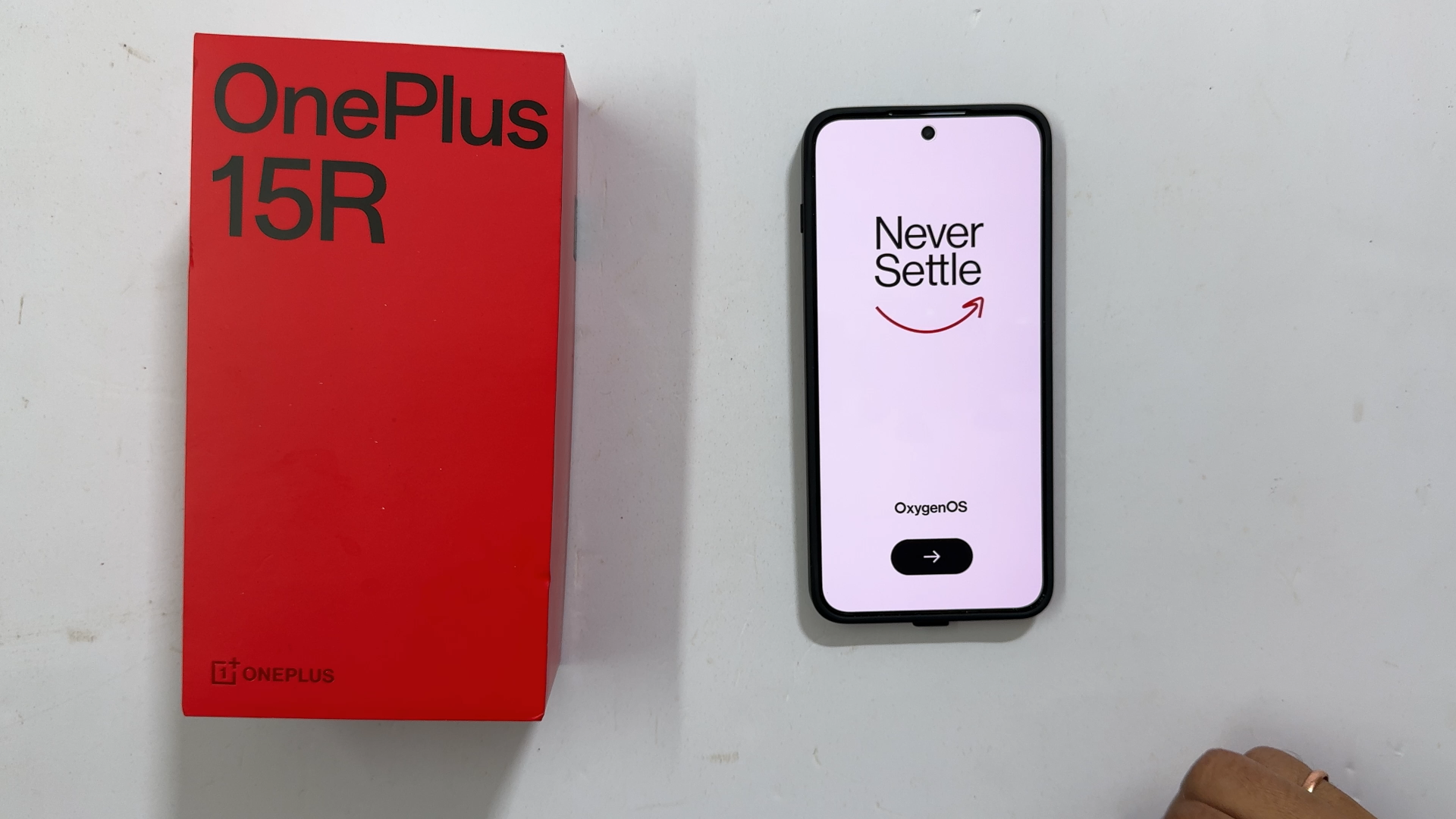
Congratulations on your new OnePlus 15R! Whether you are a long-time Android user or switching from an iPhone, the first few minutes with your device are crucial. In this tech2touch guide, we will walk you through the complete out-of-the-box setup process to ensure your smartphone is ready for peak performance.
To begin, locate the power button on the right side of your device. Long-press it until you see the iconic OnePlus logo. After a few seconds of animation, you will be greeted by the “Never Settle” welcome screen.
tech2touch Tip: Ensure your device has at least 30% battery before starting the setup to avoid any interruptions.
Step 2: Language and Region Selection
Tap the right arrow to start.
Select Language: Choose your preferred language (English, Hindi, or other regional languages).
Select Region: Choose your country (e.g., India) and tap Next.
Legal Information: Review the User Agreement and Privacy Policy. Tap Agree to continue.
Step 3: Connectivity & Data Transfer
Next, you will reach the “Setup using another device” screen.
Fresh Start: At tech2touch, we usually recommend a fresh setup for a cleaner experience. Tap Skip.
Connect to Wi-Fi: Select your network and enter your password. This is essential for downloading system updates and Google services.
Step 4: Google Services and Security
The OnePlus 15R runs on OxygenOS 16 based on Android 16.
Google Account: Sign in to your Gmail to sync your contacts, photos, and Play Store apps.
Screen Lock: We highly recommend setting up a Fingerprint or Face Unlock immediately to keep your data secure.
Step 5: Final Customization (Buttons vs. Gestures)
One of the best parts of the OnePlus 15R is the customization. You will be asked to choose your navigation style:
Buttons: The classic “Back, Home, Recent” buttons at the bottom.
Gestures: A modern, full-screen experience using swipes.
Once you’ve made your choice, tap “Let’s Go” to enter your home screen!
Frequently Asked Questions (FAQ)
1. Does the OnePlus 15R come with a charger?
Yes! In our tech2touch unboxing, we confirmed the box includes an 80W SUPERVOOC fast charger and the signature red cable.
As winter tightens its grip across India, a reliable room heater is no longer a luxury—it’s a necessity. With temperatures dropping sharply in North India and cold mornings creeping into otherwise mild regions, choosing the best room heater for Indian winters can significantly improve comfort, safety, and energy efficiency at home.
From long-lasting oil-filled radiators to instant fan and radiant heaters, here’s a carefully curated list of powerful, safe, and energy-efficient room heaters suited for different room sizes, usage patterns, and budgets.
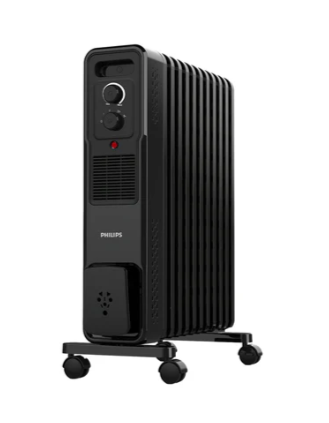
1. Philips 3000 Series Oil Filled Radiator (OFR): Best for Whole-Room, Long-Lasting Warmth
If you’re looking for silent, consistent heating that keeps your room warm for hours, the Philips 3000 Series Oil Filled Radiator is a premium and dependable choice.
Designed with innovative M-shaped fins, it offers faster and more uniform heat distribution compared to conventional OFRs. With five heat settings ranging from 400W to 2800W, it allows precise temperature control while staying energy efficient.
Smooth castor wheels & cord winder for easy mobility
Child- and pet-safe design
2-year warranty
Best for: Families seeking safe, quiet, and all-day heating.
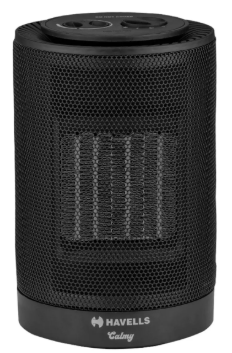
2. Havells Calmy PTC Fan Room Heater: Instant Heat on a Budget
For quick warmth in small rooms or workspaces, the Havells Calmy PTC Fan Heater is a practical and affordable option.
Its PTC ceramic heating element ensures fast, efficient, and safer heating compared to traditional coil heaters. With dual heat settings (600W & 1200W), users can balance comfort with power consumption.
Key highlights:
Compact & lightweight design
Overheat protection for safety
Energy-efficient ceramic heating
1-year warranty
Best for: Students, office desks, and personal use in small rooms.
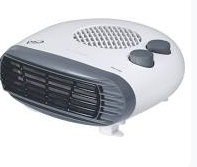
3. Orpat OEH-1260 Fan Heater: Portable & Powerful Heating Anytime
If portability and instant heating are your priorities, the Orpat OEH-1260 Fan Heater delivers excellent value.
With a powerful 2000W output, it quickly heats up enclosed spaces like bedrooms and study rooms. Simple controls, dual heat modes, and a cool air option make it easy to use year-round.
Key highlights:
Lightweight & easy to carry
Fast heating for short winter use
Overheat protection & safety cut-off
Best for: Tenants, students, and users needing a no-frills portable heater.
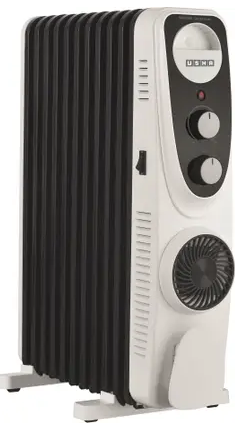
For those who prefer steady warmth without harsh airflow, the Usha 4211 FU Oil Filled Radiator is a trusted choice.
Its 11 U-shaped fins combined with a built-in PTC fan ensure even heat circulation across the room. An adjustable thermostat and three heat settings help maintain a comfortable temperature over long hours.
Key highlights:
Quiet operation—ideal for sleeping or working
Even heat distribution
Energy-efficient for extended use
Best for: Living rooms and master bedrooms requiring prolonged heating.
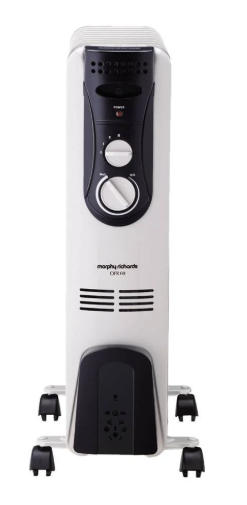
Designed for extended winter use, the Morphy Richards 9-Fin OFR offers gentle, ambient warmth that doesn’t dry out the air.
By heating surrounding walls and furniture through convection, it keeps rooms warm even after switching off. With thermostat control and an ISI-approved build, it ensures safety and durability.
Key highlights:
Skin- and lung-friendly heating
Long heat retention
Durable, safety-certified construction
Best for: Long winter nights and relaxed indoor living.
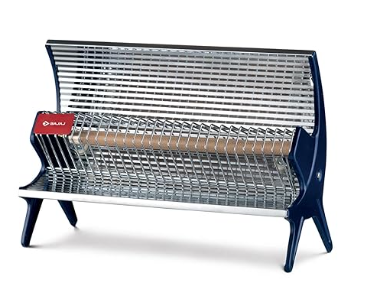
Bonus Pick: Bajaj Flashy Radiant Room Heater – Instant Heat for Small Spaces
If you need quick warmth for short durations, the Bajaj Flashy Radiant Heater is a simple and effective option.
Powered by a 1000W heating system, it’s ideal for 50–100 sq. ft. areas like bedrooms, study corners, or dining spaces.
Key highlights:
Instant radiant heating
6A plug compatible with standard sockets
Lightweight & easy to set up
1.5-meter power cord for flexible placement
Best for: Short-term heating in compact spaces.
Final Thoughts: Choosing the Right Room Heater for Your Home
As winter temperatures continue to dip, investing in the right room heater can greatly enhance daily comfort at home. Whether you need instant heating for a few hours or steady warmth throughout the day, today’s heaters offer safe, energy-efficient, and user-friendly solutions.
By selecting a heater based on room size, usage duration, power consumption, and safety features, you can enjoy a cozy winter without compromising peace of mind. A well-chosen room heater doesn’t just beat the chill—it makes winter living warmer, safer, and more comfortable.