Category: Smartphones

  • Redmi K20 Pro Cons and Pros- FAQ

    Redmi K20 pro is a premium flagship smartphone when it comes to features. AMOLED display panel, Snapdragon 855 SoC, Triple camera setup, Pop UP selfie camera and 4000 mAh battery are the USP of the device. Here is our Redmi K20 Pro review based pros and cons in the form of FAQ.

    The Redmi K20 Pro is the most affordable smartphone which has Snapdragon 855 processor. It is available in two variants. One with 6GB of RAM and 128GB of storage priced at Rs. 27,999, and the other with 8GB of RAM and 256GB of storage priced at Rs. 30,999.

    Redmi K20 Pro Pros and Cons, FAQ

    Redmi K20 Pro
    What are different color variants of Redmi K20 Pro available in India?

    This Redmi flagship is available in three color variants. Glacier Blue, Carbon Fiber Black and Flame Red.

    What are the key specification of Redmi K20 Pro?

    Snapdragon 855 SoC.
    6.39 inch Full HD+ AMOLED screen.
    6/8GB RAM and 128/256GB internal storage.
    Rear Triple Camera setup-48MP+13MP Wide Angle+8MP zoom.
    20MP pop up selfie camera.
    4000 mAh battery with quick charge support.

    Does Redmi K20 Pro has Always On Display?

    Yes. It is called as “Ambient display” in this device. You have the option to customize the clock style and background of this Ambient display.

    What type of protection glass used in Redmi K20 Pro?

    The device has Corning Gorilla Glass 5 on front and back.

    How is the call quality and signal reception?

    It is good.

    What are the cons of Redmi K20 Pro?

    Here is the list of Redmi K20 pro cons according to us.
    1. Indoor and Low light portrait mode needs improvement.
    2. There is no Optical image stabilisation.
    3. No NFC support and IR Blaster.
    4. It does not have water and dust resistance certification.
    5. No stereo speaker.
    6. MIUI Ads.

    What are the pros of Redmi K20 Pro?

    Here is the list.
    1. Good design and build quality.
    2. AMOLED Display panel with Hardware dimming feature. Good auto brightness calibration.
    3. 3.5mm headphone jack.
    4. Good Battery life.
    5. LED Notification light.
    6. Good performance.

  • Huawei Y9 Prime With 16MP Pop-up Selfie Camera Launched in India

    Huawei Y9 Prime 2019 is launched in India. The phone will go on sale starting August 7. Huawei Y9 prime 2019 will compete with the likes of Realme X, Vivo Z1 Pro and Galaxy A50.

    Huawei Y9 Prime has octa-core HiSilicon Kirin SoC with 4GB of RAM and 128GB of internal storage. The device runs on EMUI 9.1 based on Android 9 Pie. Memory can be expanded through microSD card upto 512GB. The connectivity features of the device are, Dual SIM, 4G VoLTE, Wi-Fi, Bluetooth, GPS/ A-GPS, and USB Type-C port.

    The sensors in the device are ambient light sensor, gravity sensor, gyroscope, magnetometer, and a rear-mounted fingerprint sensor. Huawei Y9 Prime sports 6.59-inch full-HD+ (1080×2340 pixels) TFT display with 19.5:9 aspect ratio and 391 ppi of pixel density.

    Coming to camera department, Y9 Prime has triple camera setup in the back. This comprise of 16MP primary sensor coupled with 8MP secondary wide angle sensor and a 2MP depth sensor. The rear camera setup said to recognise 22 categories and over 500 scenes in a real time. It also has 16MP selfie camera that is available as a part of the pop-up module. The pop up module is touted to withstand a pressure of 15 kilograms. The phone has 3D Portrait retouching feature that works with both the rear and front cameras to retouch your selfies with various lighting effects. Both cameras are equipped with AI features.

    Huawei Y9 Prime houses 4000mAh, which charges through USB Type-C. The device measures 163.5×77.3×8.8mm and weighs 196.8 grams.

    Huawei Y9 Prime

    Huawei Y9 Prime Key Specification

    • Octa-core HiSilicon Kirin 710 SoC.
    • 4GB RAM and 128GB of internal storage.
    • MicroSD card support upto 512GB.
    • 6.59-inch full-HD+ (1080×2340 pixels) TFT display with 19.5:9 aspect ratio.
    • Triple camera setup at rear which includes 16-megapixel primary sensor, 8-megapixel secondary sensor with an ultra-wide-angle lens, and a 2-megapixel tertiary sensor.
    • 16MP pop up selfie camera.
    • 4000 mAh battery.

    Huawei Y9 Prime FAQ

    What is the Huawei Y9 Prime price in India?

    The device price in India is Rs.15,990.

    What are the launch offers?

    Huawei Y9 Prime will be available to purchase from Amazon.in. It will be available through offline stores as well. Customers can prebook the phone through Croma, Poorvika, and other major retail outlets starting August 5. The customers who pre book will get Huawei Sport BT headphones and a 15,600mAh power bank both worth Rs. 4,598. Launch offers on Amazon.in are instant cashback worth Rs. 500 through Amazon Pay and instant discount of 10 percent specifically for SBI cardholders. There will also be an additional exchange discount of up to Rs. 1,500 and no-cost EMI options for six months.

    What are the different color options available?

    Huawei Y9 Prime 2019 will be available in Emerald Green and Sapphire Blue colour options.

    What are the Huawei Y9 Prime Cons?

    Based on specifications, here is the list of Huawei Y9 Prime demerits.
    1. No NFC.
    2. Hybrid sim card slot. No dedicated microSD card slot.

    How to take screenshot in Huawei Y9 Prime?

    To take screenshot in Huawei Y9 prime, you can use power button and volume button method or use screenshot button.
    On a screen on which you want to take screenshot, press and hold power and volume down buttons. Screenshot will be captured.

  • How to take screenshot in Motorola One Vision

    Motorola One Vision is the third phone from “Motorola One” family which runs on Android One platform. It has near stock version of Android. Even though it runs on near stock Android, Motorola added few useful customisation. It includes additional way of taking screenshot. So in this post, we will cover how to take screenshot in Motorola One Vision.

    Motorola One, Motorola One Power are the two other phones from “Motorola One” family. Motorola One Action and Motorola One Pro are the two phones which is expected to launch in the coming months.

    Take screenshot in Motorola One Vision- 3 Different Methods

    Take screenshot in Motorola One Vision

    Take screenshot using Hardware Keys

    This is one of the easiest and common method available on Android phones.

    • Go to desired screen.
    • Press and Hold Volume down and power button simultaneously.
    • This will save screenshot.

    Take screenshot using the Three Finger Touch Method

    This method is part of the featured added under Moto Actions. To enable this method, you need to enable this feature. For that,

    • Browse to Settings>> Features > Moto Actions.
    • Enable Three Finger screenshot and Screenshot editor.

    For taking the screenshot,

    • On a page you want to capture screenshot, just touch the screen with three fingers.
    • It will take screenshot.

    Capture screenshot using screenshot button

    For using this method,

    • Navigate to the page you want to take screenshot.
    • Press and hold power button.
    • You will get options in the screen. Select the “Screenshot“.
    • Screenshot will be captured.

    How to take scroll or long screenshot in Motorola One Vision

    • Take screenshot using any of the above mentioned methods.
    • Touch the double down arrow to scroll and capture.
    • To stop scrolling before the end of the page, touch STOP.

    Where to access taken screenshot?

    You can access the taken screenshot from Photos>>Device folders >> Screenshots.

  • Transfer Data From An Android To OnePlus 7 or OnePlus 7 Pro

    You might have already purchased or thinking of buying a new Oneplus 7 or OnePlus 7 Pro. One of the main thing while upgrading the smartphone is how to transfer data from old phone to new one. In this post we will cover how to transfer data from other Android phone to OnePlus 7 or OnePlus 7 Pro.

    If you are already using older version of OnePlus phones such as OnePlus 3, Oneplus 3T, OnePlus 5, OnePlus 5T, OnePlus 6 or OnePlus 6T, it is very easy to transfer data to latest OnePlus 7 or OnePlus 7 Pro.

    OnePlus Switch is an app which helps to transfer data from any Android phone running on Android 5.0 or higher to OnePlus 7 or OnePlus 7 Pro. Users can transfer data between the phones using the WiFi hotspot. If you are OnePlus user, then you can even transfer launcher and launcher customisations. For now, only OnePlus launcher is supported.

    You may like to read:

    Transfer Data From An Android To OnePlus 7 or OnePlus 7 Pro

    Here is the step by step guide to migrate data from Android phone to OnePlus 7 or OnePlus 7 Pro.

    Time needed: 15 minutes

    Steps to migrate data from Old OnePlus phone to OnePlus 7 or transfer data from other Android phone to OnePlus 7 Pro.

    1. Install OnePlus Switch App on Old Android or OnePlus phone

      Go to Google Play store. Search OnePlus Switch. Install the app on your old phone.

    2. Open OnePlus Switch App in OnePlus 7 or OnePlus 7 Pro.

      If it is not installed, install it from Playstore.

    3. Launch OnePlus Switch App on old phone.

      If your old device is OnePlus phone then select “I’m an Old Phone”.

    4. Scan the QR code of OnePlus 7 from old phone.

      You need to provide full permission to OnePlus Switch App. Then scan the QR code showing in new phone OnePlus switch App from old phone OnePlus Switch app.

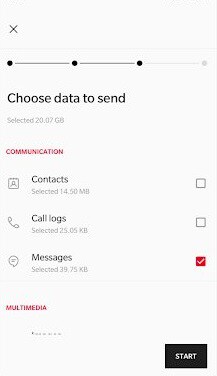
    5. Select the Data to transfer

      You can choose the data you want to transfer from old phone to new one.
      Transfer data from Android to OnePlus 7

    6. Tap on Start

      Data migration will start. Depending on the size of the data transfer, timings will vary.

    7. Data migration from Old phone to new phone complete

      Now you can access all the migrated data in new OnePlus 7 or OnePlus 7 Pro.

    Summary of Data migration from Android phone to OnePlus 7 or OnePlus 7 Pro

    Data migration from old Android phone to OnePlus 7 or OnePlus 7 Pro is easy. If your upgrading from older OnePlus phone, then you can even migrate Launcher and its customisations. OnePlus Switch can transfer installed apps as well. However, we felt it is better not to transfer apps via OnePlus Switch. Because, we faced issues in updating the apps.

  • Vivo Z1 Pro Review-Pros and Cons

    Vivo Z1 Pro is a new sub 20k range smartphone launched in India recently. It has impressive spec sheet and aggressive price. This is the first Online focussed smartphone from Vivo and will be available via Flipkart. Here is our Vivo Z1 Pro review with pros and cons.

    The base variant of Vivo Z1 Pro price in India is ₹14,990 for the 4GB RAM and 64GB storage variant. There are other two variants. 6GB RAM and 64GB storage variant price in India is ₹16,990 and 6GB RAM and 128GB storage price is ₹18,990.

    In this price range it will compete with the likes of Tecno Phantom 9, Galaxy A50, Redmi Note 7 Pro and RealMe 3 pro. Considering this competition, here is the review of Vivi Z0 pro pros and cons.

    Vivo Z1 Pro Review

    Vivo Z1 Pro Pros and Cons

    Vivo Z1 Pro Pros

    Here are some of the Vivo Z1 pros or merits.

    Battery Life

    Vivo Z1 Pro houses a massive 5000 mAh battery. It also has Vivo’s own Dual Engine Fast Charging tech. Massive battery with optimisation provides very good battery life. In most of the situation, it lasts more than 2 day.

    Decent Camera

    The device comes with triple camera setup at back. It consist of 16-megapixel camera with an f/1.78 aperture, an 8-megapixel wide-angle camera with an f/2.2 aperture, and a 2-megapixel depth sensor. Photos came out good considering the price segment.

    There is a 32-megapixel sensor and f/2.0 aperture in the front. The photos are decent enough to share in social media.

    Performance

    Vivo Z1 Pro is powered by Snapdragon 712 processor with 4GB or 6GB of RAM. It runs on Funtouch OS based on Android 9.0. The real time usage performance is good and there was no lagginess observed.

    Display

    Vivo Z1 Pro sports a big 6.53 inch full HD+ IPS LCD screen with 19.5:9 aspect ratio and a punch hole for camera. Display sharpness and legibility are good. But colors are not as vivid as Galaxy M30, Redmi Note 7 Pro etc.

    Vivo Z1 Pro Cons

    • Video recording stabilisation is not great.
    • No depth or portrait mode for front facing camera.
    • Uses micro USB port. No USB-C port for charging and data transfer.

    Verdict:

    Vivo Z1 Pro is a good all round performer for the price range. However, there are few areas which fails to impress.