Category: Smartphones

  • iPhone 11 FAQ – Features you may like to know

    Apple iPhone 11 is official now. The new lineup has several improvements which include raw performance as well as the camera. Here is the quick information in the form of iPhone 11 FAQ.

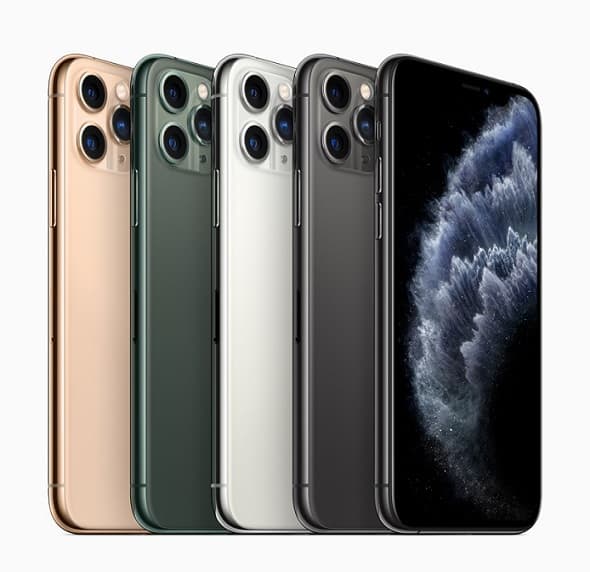
    Apple has made some major changes to the iPhone 11 lineup by adding better camera setup, smarter sound, new colour options and improved processor. Here is the quick summary of iPhone 11 lineup.

    iPhone 11 FAQ Features and Price

    iPhone 11 FAQ

    Image Source: Apple Newsroom

    You may like to read:

    How to take a screenshot in iPhone 11- 2 different methods

    What are the different variants of iPhone 11 available?

    The new iPhone 11 lineup consists of 3 major variants apart from storage. They are
    1. iPhone 11
    2. iPhone 11 Pro
    3. iPhone 11 Pro Max

    What is the difference between iPhone 11 and iPhone 11 Pro?

    Biggest difference between iPhone 11 and iPhone 11 Pro are display and camera setup. Key difference comparison is given below.
    Display
    iPhone 11: It has 6.1 inch LCD display panel(Liquid Retina HD display) with the screen resolution of 1792×828 and 326 PPI pixel density. 1400:1 contrast ratio. and 625 nits max brightness.
    iPhone 11 Pro: It has 5.8 inch OLED screen(Super Retina XDR display) with the screen resolution of 2436×1125 and 458 PPI pixel density. 2,000,000:1 contrast ratio and 800 nits max brightness.
    Camera
    iPhone 11: Rear dual camera setup.12MP Ultra Wide and 12MP Wide cameras.
    iPhone 11 Pro: Rear triple camera setup. 12MP Ultra Wide and 12MP Wide cameras. It also has additional 12MP Telephoto camera.

    How much is the new iPhone 11 in India?

    Based on storage, it is available in three price variants.
    64GB variant of iPhone 11 price is ₹64,900.
    128GB variant of iPhone 11 price is ₹69,900.
    256GB variant of iPhone 11 price is ₹79,900

    Does iPhone 11 support dual sim cards? What type of sim cards can be used?

    Yes. It supports 1 nano sim card and another eSIM. You can read more on this here.

    Is the iPhone 11 water and dust resistant?

    Yes. It is rated IP68(maximum depth of 2 metres up to 30 minutes) under IEC standard 60529.

    Does iPhone 11 have Wireless charging support?

    Yes.

    Does the iPhone 11 have USB C?

    No.

    Why are there 3 cameras on the iPhone 11 Pro?

    First one is a wide-angle lens. The second one is the ultra-wide-angle lens. The third one is the telescopic lense.

    What size is the iPhone 11?

    It has 150.9 mm (5.94 inches) of height. 75.7 mm (2.98 inches) of width and 8.3 mm (0.33 inches) of depth. iPhone 11 weighs 194 grams.

    How much is the iPhone 11 Pro Max in India?

    Based on storage, it is available in three price variants.
    64GB variant of iPhone 11 Pro Max price is ₹1,09,900.
    128GB variant of iPhone 11 Pro Max price is ₹1,23,900.
    256GB variant of iPhone 11 Pro Max price is ₹1,41,900.

    How much is the iPhone 11 Pro in India?

    Based on storage, it is available in three price variants.
    64GB variant of iPhone 11 Pro price is ₹₹99,900.
    128GB variant of iPhone 11 Pro price is ₹1,13,900.
    256GB variant of iPhone 11 price Pro is ₹1,31,900.

    What is the difference between iPhone 11 Pro and iPhone 11 Pro Max?

    iPhone 11 Pro Max has a bigger display screen size and better claimed battery life.

  • Samsung Galaxy A50s vs Galaxy A50 – Which is better value

    Samsung has unveiled Galaxy A30s and Galaxy A50s in India which company claims that upgrade to the popular mid range smartphones Galaxy A30 and Galaxy A50 respectively. Here is quick comparison between Galaxy A50s Vs Galaxy A50 comparison based on the specifications.

    Samsung Galaxy A50s Vs Galaxy A50

    Here is the list of differences between these two smartphones based on the information we have at the time of writing this.

    You may like to read:

    How to take screenshot in Samsung Galaxy A50- 3 different ways.

    Samsung Galaxy A50s vs Galaxy A50

    Design

    Galaxy A50s has few changes in terms of design. Now it features 3D design with glossy pattern. Also new color variants are introduced. They are Prism Crush Violet, Prism Crush Black, and Prism Crush White colours. The design looks impressive compared to its predecessor.

    Camera

    Samsung Galaxy A50s features triple camera setup triple rear with a 48-megapixel primary shooter with f/2.0 aperture, 8-megapixel ultra-wide-angle shooter and a 5-megapixel depth sensor.  For selfies, it has 32MP shooter with f/2.0 aperture. It also has Night Mode.

    In the camera segment, Galaxy A50s has major improvements at least on paper.

    Processor

    Samsung Galaxy A50s comes with Octa Core Exynos 9611 SoC compared to Octa Core Exynos 9610 SoC in Galaxy A50.

    Price

    Samsung Galaxy A50s is price at Rs.22,999 for 4GB RAM+64GB internal storage variant. 6GB RAM variant is priced at Rs.24,999. Galaxy A50 4GB+64GB variant is available at 18,490 and 6GB RAM variant is available at Rs.21,490.

    Common features between Galaxy A50s and Galaxy A50

    SoC, RAM and storage

    Both smartphones are powered by octa-core Exynos 9610 SoC based on 10nm manufacturing process and Mali-G72 MP3 GPU with 4GB/6GB RAM and 64GB of internal storage. Both the devices runs on Android Pie with OneUI.

    Display

    Galaxy A50s as well as Galaxy A50 sports 6.4 inch full HD plus (1080×2340 pixels) Infinity-U Super AMOLED display.

    Battery and Fingerprint scanner

    Samsung Galaxy A50s as well as Galaxy A50 houses 4000 mAh battery with in display fingerprint scanner.

    Galaxy A50s Vs Galaxy A50 summary

    Going by the specifications, Galaxy A50s provides better camera and design.

  • How to set custom ringtone in Galaxy M20, M10 and M30

    If you don’t like default ringtone of your new Samsung Galaxy smartphone, you can customise it with your choice of ringtone. Galaxy M20, M10 and Galaxy M30 provides the option to have different ringtone to each sim card and each contact. In this tutorial, we will explore way on how to set custom ringtone in Galaxy M20, M10 and M30.

    Samsung Galaxy M20, M10 and M30 supports dual sim cards. You can set the different ringtone to each sim card. If you want to set the different ringtone to some of your contacts, that option also available.

    You may like to read:

    How to take a screenshot on Galaxy M20, M10 and Galaxy M30

    How to set custom ringtone in Galaxy M20, M10 and M30

    Set custom ringtone to each sim card in Galaxy M20, Galaxy M10 or Galaxy M30

    • Go to Settings->Sounds and Vibration.
    • Select RINGTONE.
    • Select the SIM you want to set custom ringtone.
    • You can choose pre installed ringtones or add custom ringtone by tapping on ADD in the right top corner.
    • Select the ringtone from your phone internal storage.
    • Then Tap on Done.

    Set custom ringtone to contacts

    To set different ringtone to contacts,

    • Open the Contacts app.
    • Select the contact you want to set custom ringtone.
    • Now tap on “EDIT”. Then select “View more”.
    • Navigate the contacts details. You will find “Ringtone” option. Tap on it.
    • You can set ringtone from the pre set list or add new ringtone by tapping “ADD”.
    • Once done, select “Done”.

    Set custom tone for notification sounds

    • Go to Settings->Sounds and Vibration.
    • Select Notification Sounds.
    • Choose the tone you want to have as notification sound.

    How to enable or disable dialing keypad tone and keyboard sound in Galaxy M20, M10 and Galaxy M30?

    • Go to Settings->Sounds and Vibration.
    • Scroll down.
    • You will find options Keyboard Sound. You can enable or disable.
    • Similarly you can enable or disable Dialing Keypad tones.

    Summary: This way you can set custom ringtone in Galaxy M20, M10 or M30. Personalising the smartphone with custom ringtone is recommended as to avoid confusion in crowded places.

  • Samsung Galaxy A10s FAQ

    Samsung launched yet another affordable smartphone from Galaxy A series- Galaxy A10s. This is the successor to the budget Galaxy A10. It has several improvements compared to its predecessor. Here is the quick Samsung Galaxy A10s FAQ.

    In this post we tried to cover the features of Galaxy A10s in the form of FAQ.

    Samsung Galaxy A10s FAQ

    Samsung Galaxy A10s FAQ
    Black variant of Galaxy A10s

    What is the cost of Samsung Galaxy A10s in India?

    Galaxy A10s price starts at Rs. 9,499 for the variant which has 2GB of RAM and 32GB of internal storage. While 3GB RAM and 32GB internal storage variant price is Rs.10,999.

    Where to buy Galaxy A10s?

    Starting August 28, you can buy Galaxy A10s from online retailers, retail stores, the Samsung India E-Shop, and Samsung Opera House.

    What are the different color options available?

    The device will be available in Black, Blue, and Green colour variants.

    How big is the Samsung A10s?

    The dimension of the device are 156.9×75.8×7.8mm and weighs 168 grams.

    What are the features of Galaxy A10s?

    • 6.2 inch HD+(720×1,520 pixels) Infinity-V Display.
    • Octa Core SoC with 2GB or 3GB of RAM.
    • 32GB internal storage.
    • Dual camera setup. 13MP primary camera with f/1.8 and 2MP depth sensor.
    • 8MP front facing camera with f/2.0.
    • 4000 mAh battery.

    Does it has dedicated microSD card slot?

    Yes.

    What are the changes in Galaxy A10s over Galaxy A10?

    • Dual camera setup instead of single camera setup.
    • 8MP selfie camera compared to 5MP camera on Galaxy A10.
    • 4000 mAh battery vs 3400 mAh battery.
    • Fingerprint scanner.

    Does Samsung Galaxy A10s has fingerprint scanner?

    Yes. It has rear mounted fingerprint scanner.

    How to take screenshot in Samsung Galaxy A10s?

    To take screenshot,

    • Go to the page or app on which you want to take screenshot.
    • Press and hold volume down and power button simultaneously for around 2 seconds.
    • Screenshot will be captured.
    • You can access taken screenshot from Gallery->Screenshot.

    These are the basic Samsung Galaxy A10s FAQs. If you have any specific questions, please write in the comment section below.

  • How to remap Bixby/Power Key in Galaxy Note 10

    How to power off Galaxy Note 10 or Galaxy Note 10 Plus? If you are new owner of Samsung Galaxy Note 10, you may get this question. Samsung renamed and added Bixby functionality apart from changing the placement of erstwhile power key. Now it is called as side key. In this post, we will show you how to remap Bixby or Power Key in Galaxy Note 10.

    In Galaxy Note 10 and Note 10 Plus, there is no button in the right side. Instead, company moved the power key to the left side. Single press will turn on or off the screen. If you long press sidekey, it will open Bixby instead of power menu. Double press of the key will launch camera.

    Luckily, this Power key or side key is customisable. You can assign different function to side key. Let us begin our tutorial on how to remap Bixby Key or Power Key.

    You may like to read:

    How to take screenshot in Samsung Galaxy Note 10 & Galaxy Note 10 Plus

    Samsung Galaxy Note 10 FAQ, Pros and Cons

    How to customise Bixby or Power Key or Side key

    How to customise Bixby or Power Key
    • Go to Settings.
    • Navigate to Advanced Features.
    • Tap on Side Key.
    • Now under Press and hold, select power off menu.
    • Similarly you can assign double press to open bixby or other app.

    You can access the Side Key settings menu from Power off menu as well. For that,

    • Go to notification area from home screen.
    • Tap the Power icon.
    • At the bottom of power menu screen, you will find Side key settings.
    • Tap on it.
    • Now you can assign power off menu to Press and hold of side key.

    In one way, it is a welcome move. Because, it provides option to users to customise the key. Power off or restarting device, we don’t do regularly. So assigning different task is good idea. But if it has other options other than Bixby, it will become more practical.

    What do you feel about new arrangement in Samsung Galaxy Note 10 and Galaxy Note 10 Plus? Please share in the comment section below.