
Author: Aniruddh

  • Top 5 reasons to buy Samsung Galaxy S7

    Samsung has launched its new flagship smartphones Galaxy S7 and Galaxy S7 edge in India. It has many new features and some are improved features over its predecessor. Here is the quick 5 advantages of Galaxy S7 over its predecessor according to us.
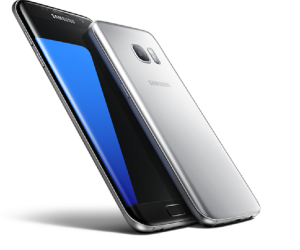
    Samsung Galaxy S7

    Top 5 reasons to buy Samsung Galaxy S7

    1. MicroSD card support/ Dual sim support: Last year Samsung has omitted microSD card in its Galaxy S6. However, Samsung has added back the microSD card in its new flagship. Users can now add upto 200GB of microSD card. It is worth mentioning that, Galaxy S7 supports hybrid sim card slot. So, users can add a sim card instead of microSD card. This is a welcome move which enables the user to use dual sim if they don’t want to use memory expansion through microSD card.
    2. Water and Dust Resistant Body

    Samsung Galaxy S7 comes with IP68 rating for water and dust resistance. This means, Galaxy S7 is water resistant to a maximum depth of 1.5 meter for upto 30 minutes.

    3. Always on screen

    Samsung Galaxy S7 comes with a new features called Always on screen. This means that, the screen stays on for all the time and displays basic information like the clock and calendar.

    4. Better camera:

    Samsung Galaxy S7 comes with improved camera. According to the company statement, it can capture better low light photography compared to its predecessor. Also in the camera settings, there is a new option called “Motion Panorama” which allows you to take a panoramic shot that will animate when you scroll over it. This features is very similar to Apple’s Live photos.

    5. Longer battery life:

    Samsung Galaxy S7 comes with larger battery than its predecessor Galaxy S6. As per the company, even with always on screen feature, device is capable of providing complete day of usage with normal usage.

  • How to capture screenshot on Honor Holly 2 Plus

    Honor Holly 2 Plus is a budget dual sim Android smartphone. Taking screenshot is an useful functionality which helps in many occasions such as saving a error log, payment reciepts or for sharing the high score of a game with friends etc. In this post, we will learn different methods available on Honor Holly 2 Plus to take screenshot. The price of Holly 2 Plus in India is Rs.8,499.

    How to take screenshot on Honor Holly 2 Plus

    There 2 methods through which you can take screenshot on Honor Holly 2 Plus.

    1. Volume down and power button method.
    2. Using the screenshot button.

    Volume down and power button method of taking screenshot on Honor Holly 2 Plus

    For taking screenshot, you need to press and hold volume down and power button simultaneously for few seconds.  The screen will flicker and shutter sound confirms that, the screenshot is captured. The taken screenshot will be saved in gallery folder.

    Taking screenshot on Honor Holly 2 Plus using the screenshot button

    Honor Holly 2 Plus runs on a customs skin called EMUI which is based on Android. This customization added another way to capture screenshot on Honor Holly 2 Plus which is mentioned below.

    Screenshot button on Honor 5X

    • Go to the Honor Holly 2 Plus screen on which you want capture screenshot.
    • Go to quick settings menu which you can access by swiping down on from the top.
    • In the quick settings menu, you will find a icon for screenshot button.
    • Tap on to it will capture the screenshot.
    • Taken screenshot will be saved in the gallery section.

    Honor Holly 2 Plus is powered by 1.3 GHz Quad core Processor MTK MT6753P with 2GB of RAM and 16 GB Internal Memory. It also supports expandable Storage through microSD card upto 128 GB. As far connectivity, it has 2G, 3G, 4G and CDMA. Holly 2 Plus houses 13 MP Primary camera and 5 MP Secondary  front facing Camera.

    If you find any difficulties in taking screenshot please share it in the comment section below.

  • Asus Zenfone Android 6.0 Marshmallow Update coming soon

    Asus Zenfone 2 smartphones became very popular because of its value for money offering and user friendly ZenUI. Zenfone Zoom with 3x optical zoom proved technical capability of Asus team. However, sadly, this phone didn’t release with latest Android version Marshmallow. Now, Asus has finally revealed the list of smartphone which are going to get Android 6.0 Marshmallow.

    Which are the Asus Zenfone Variants going to get Android 6.0 Marshmallow?

    Asus has announced the roll out of Android 6.0 Marshmallow update for the users in India for the following Zenfone Variant. For these variants, updates will start rolling out from this month.

    • ZenFone 2 (ZE550ML, ZE551ML)
    • ZenFone 2 Deluxe (ZE551ML)
    • ZenFone 2 Laser ( ZE500KL, ZE550KL, ZE601KL)
    • ZenFone Selfie (ZD551KL)
    • ZenFone Max (ZC550KL)
    • ZenFone Zoom (ZX551ML)

    The new Android 6.0 update will replace three ZenUI apps-ASUS Messenger, ASUS Mail and ASUS Calendar with Google Messenger, Calendar, and Gmail apps as the default apps in Android 6.0 version of ZenUI. Do note that, it will happen if and only if you do factory reset after the update. If you do the factory reset after update and if you want to have ASUS Messenger, ASUS Mail and ASUS Calendar, then you need to download it from Play store.

    The older Zenfones which are not mentioned here also will get Android 6.0 starting from April. However, Asus has not revealed on which are they.

    Google Android 6.0 is largely provides improved performance rather than changes in the design language. The Now on Tap, Doze, ability to use microSD card as internal storage are some key features of this new Android version.

    Android 6.0 introduced with Nexus 5X and Nexus 6p. Then we saw Motorola devices to get the update. Recently  Samsung Galaxy S6, Galaxy S6 Edge,  Sony Xperia Z5 as well started getting Android 6.0 update. So far, Android Marshmallow adoption rate is 1%. It is a welcome move from Asus to provide latest and greatest Android experience to Zenfone users.

  • How to type Indian regional languages in Asus Zenfone Max

    Typing Indian languages such as Kannada, Hindi, telugu, tamil, Bengali, Malayalam etc in Zenfone Max is very easy. Now, there is no requirement of any external  app. Here is the step by step guide on how to type Indian languages in Zenfone Max.

    How to type Indian regional languages in Asus Zenfone Max

    As mentioned before, for typing indian languages such as Kannada, Hindi, telugu, tamil, Bengali etc, first you need to enable the respective languages in the settings.

    • Go to ‘Settings’->’Language & input’

    Type Indian Language

    • Tap on to ‘ZenUI Keyboard’

    Type Indian Language

      • Now tap on to “Input languages’.

    Type Indian Language

    • In this page, you have list of input languages already available in the device.
    • Find and select the input language by check marking.

    Adding Input languages

    If the input language which you are looking for is not available in the list, then you need to add that language.  For that,

    • Tap on to Plus symbol(+) in the top of the screen.

    Type Indian Language

    • You will find many more languages.
    • Select the language which you want to download.
    • Once downloaded, you can select it in previous page as mentioned before.

    How to shift between languages while typing in Zenfone Max

    Shift between Languages

    Whenever, you want to type language in messages, whatsapp messages etc, tap on to ‘En…” button. It will change the languages.

    Video on how to type Indian Languages in Zenfone Max

    I have made video on demonstrating how to type Indian languages in Asus Zenfone Max.

  • Asus GL552JX Laptop Review – Pros and Cons

    Asus GL552JX is the recently launched gaming laptop from Asus’s Republic of Gamers(ROG) series. With this, Asus has tried to provide good performing gaming laptop within the price of 1lakh.  The price of Asus GL552JX in India is Rs. 81990. However, you can get it for Rs.79,990 in online portals like Flipkart, Amazon etc.

    Asus GL552JX comes with eye catching design and good build quality. The black and red combination which we have seen on other ROG series laptop continues here as well. The chassis is made from good quality plastic and it feels solid. The rubberized coating over the lid along with a metallic strip in the middle with an illuminated  Republic of Gamers logo looks very nice.

    Asus ROG Laptop

    Asus GL552JX has 15.6 inch full HD IPS display screen with matte-black finish that eliminates glare for stunning visuals without distraction. The viewing angles are great and colors look vivid. As it has matte screen, it has very minimalist reflections which makes this laptop comfortable to use in different lighting condition.

    Asus GL552JX comes with visually striking keyboard. It has black and red theme here as well. You can change the intensity of the backlight  or completely switch off. The keys are well placed and there is a dedicated numeric pad as well. The keys decent travel makes them comfortable for typing and gaming. Overall the keyboard experience in this laptop is excellent.

    Asus ROG Notebook

    Asus GL552JX has decently large track pad. The button response is good and you will get all the usual gestures of Windows 10. Coming to ports, GL552JX offers three USB ports out of which two are USB 3.0, one HDMI output, Gigabit LAN, VGA, headphones and microphone ports, and a Kensington lock.  There is also a DVD writer and an SD card slot.

    Asus GL552JX is powered by 2GHz quad-core Intel Core i7-4750HQ with a Turbo frequency of 3.2GHz and HyperThreading. It has 8GB of 8GB DDR3 RAM running at 1600MHz.  There is dedicated NVIDIA  GeForce  GTX 950M with 4GB DDR3 VRAM graphic card. For storage, out of the box, we get 1TB 2.5-inch hard disk running at 7200rpm from HGST. There is also a M.2 (2280) SSD slot with SATA3 interface if you would like add additional SSD.

    Asus GL552JX ships wth 64 bit Windows 10 Home with some other useful pre installed softwares. Asus bundles some of its own software such as AudioWizard for tweaking the sound profiles for gaming, movies, etc. GameFirst III which also ships with its gaming motherboards, prioritises game data traffic to reduce lag during online gameplay. You also get a one month trial of Microsoft Office 365, 25GB of Dropbox space for six months, and a year’s subscription to McAfee LiveSafe.

    Upgradation of RAM or hard disc on GL552JX is very easy. By sliding off upgrade panel, you can add bigger hard drive, M.2 SSD or more memory. There is a one empty RAM channel which you can use to add additional upto 8GB of RAM. This laptop cooling system is very good. Even when using for long times, palm rest and bottom part of the laptop remained cool. Coming to performance, general performance is snappy. High end games in highest setting struggles a bit. However, in medium settings, it played most of the games without any issues.

    Advantages of Disadvantages of Asus GL552JX

    Pros of Asus GL552JX

    • Stylish design and good build quality.
    • Excellent display screen.
    • Easy to upgrade option.
    • Good snappy performance.
    • Good keyboard.

    Cons of Asus GL552JX

    • Average Sound output through built in speakers.
    • Touch pad could have been better.
    • Mediocre Battery life.