Author: Aniruddh

  • PushAlert-Add Web Push Notification to website

    Have you observed a pop up window when you visit some of the websites which asks your consent to enable notifications from that website? Pushalert plugin is one such service provider. With PushAlert service you can add push alert  to wordpress blog, blogger blog, Joomla etc.  In this post we will see, how to add a web push notification to websites using pushalert service.

    Advantages of adding PushAlert Web Push Notification to website

    Here are some of the features of PushAlert PushAlert Web Push Notification.

    Multilingual Support & Opt-in Box Themes:  PushAlert supports many languages. This is a useful function as it enables you to send notification in different languages. For example, if your website is in Hindi, you can send notifications in Hindi. It also provides option to customize Opt-Box themes.

    Works with major web browsers and platforms: Pushalert web notification works well with most of the popular web browsers such as Firefox, Google Chrome, Safari etc. It works well on Android, MacOS, Linux, iOS as well.

    In-depth Analysis: There is a detailed reports which helps to analyse the performance of the campaigns easily. The analytics includes metrics including impressions, clicks, delivery rate and CTR for each notification.

    How to add Push Alert Web notification to Word Press Blog using PushAlert Plugin

    If you are using non https enabled website, then integration of push alert notification to wordpress blog is very simple. If you are using https enabled wordpress blog, then you need to do one more step.So here is the step by step guide to add push alert notification to wordpress blog.

    •  Install the PushAlert Plugin by searching for ‘pushalert’ from the “Plugins->Add New” section of your WordPress Dashboard. Alternatively, you can download the plugin and then jump to the Plugins section. Now go to Add New and then Upload Plugin.
    • If you are using https enabled website, you need to paste 2 files to root directory. You can get these files, once you register your account in pushalert. You need to go to intergrate tab. Here go to wordpress tab. Download the files and then upload it to root directory.

    How to add Push Alert Web notification to Blogger blogs

    For adding push alert web notification to blogger blogs, login to your pushalert.co account. Now browse to integrate tab. Copy the Javascript code and paste it on to head section of your blog.

    How to add Push Alert Web notification to Joomla

    You can refer to the details given in your pushalert dashboard integration page, Joomla tab.


  • Asus Zenbook 3 Review-Pros and Cons

    Zenbook 3 is a top tier 12.5 inch ultra book from Asus. It is the thinnest and lightest Intel Core i-powered laptop available today. Inspite of being a ultra portable laptop it packs some impressive  spec sheet. Here is our review on Asus ZenBook 3 UX390UA based on pros and cons.

    Asus Zenbook 3 Review

    Asus Zenbook 3 weighs only about 910 grams and is only 11.9 thick at its thickest side. The aerospace-grade aluminum alloy in its construction makes it sturdy and keeps the weight light. The minimalistic Asus branding on top with concentric circles around it and golden colored lining in the side edges gives a premium look and feel to this ultrabook. Though it is thin and lightweight, there was very little flex felt in hood or keyboard dock.  Zenbook 3 is available in 3 colours namely Rose Gold, Royal Blue and Quarts Gray. Our test unit had royal blue colour.

    Zenbook UX390UAK sports 12.5 inch IPS display screen with 1920 x 1080 pixel resolution. The screen has Corning Gorilla Glass 4 protection. The viewing angles, brightness, colour accuracy were decent. As it has Glossy screen, outdoor visibility is not great. Lack of touch screen and comparatively lower brightness level is demerits of this display screen.

    There is a 6 row keyboard with metallic keys. Keys have travel of around 0.8mm. It takes bit of time to get used to it. Typing experience is quite good on this ultrabook. Asus Zenbook 3 comes with trackpad which has layer of glass on top. There is a fingerprint scanner for Windows Hello Login.

    Our review unit of Asus Zenbook 3 is powered by Intel Core i7 7500U with 16GB of RAM. Performance of the ultrabook was good even with tasks such as Video editing, photoshop etc. While intensive applications are running, the ultrabook tends to heat up a bit. Also system fan continuously runs most of the time which produces little bit of noise.

    Asus Zenbook 3 Review-Pros and Cons

    Asus Zenbook 3 Pros-  5 Reasons to buy

    • Stylish and compact design and build.
    • Excellent performance.
    • Good display panel.
    • Good battery life.
    • Excellent trackpad.

    Asus Zenbook 3 Cons-  Reasons not to buy

    • Limited ports.
    • Does not have touch screen variant.
    • System fan noise.
  • Smartron srt.phone FAQ Features Cons

    Smartron has launched its much anticipated smartphone srt.phone in India. It is also promoted as Sachin Tendulkar SRT Smartphone. The  phone is launched by master blaster himself. In this post we will have a quick look into FAQ, Features and Cons of Smartron srt.phone.

    Smartron srt.phone

    Srt.phone will be available exclusively via Flipkart from today. Currently only titanium Grey colour variant available to the user. It will compete with the likes of Xiaomi Redmi Note 4, Honor 6X etc.

    Smartron srt.phone FAQ Features Cons

    What are the different variant of this phone available?

    The srt.phone by Smartron will be available in 2 variants. One with 32GB of internal storage and another one with 64GB of internal storage.  32GB variant is priced at Rs.12,999 and 64GB variant is priced at Rs.13,999.

    What type of sim cards srt.phone accepts? Does it has microSD card support?

    Smartron srt.phone supports 2 micro SIM cards. It does not supports microSD card.

    Does it has fast charging feature?

    Yes. It does supports Qualcomm fast charging 2.

    What type of display protection srt.phone has?

    srt.phone has Corning Gorilla Glass 3 protection.

    What are the specification?

    Quick specification summary is given below.

    • 1.8 GHz Octa Core Snapdragon 652 SoC with Adreno 510 GPU.
    • 4GB RAM and 32/64GB internal storage.
    • 5.5 inch full HD display screen with Corning Gorilla Glass 3 protection.
    • 13MP primary camera with LED flash.
    • 5MP front facing camera.
    • 3000 mAh battery with fast charging support.
    • Fingerprint scanner.

    What are the Cons of Smartron srt.phone

    Demerits of Smartron srt.phone mentioned below are purely based specification sheet and comparison with other smartphones in the price segment.

    Smartron srt.phone Cons

    • No microSD card support.
    • Back panel is made up of plastic.
    • No earphones in the retail box.
    • Bit outdated SoC.

    What are the box content of srt.phone?

    Box content of the phone includes, srt.phone, USB-C to USB cable, power adaptor.

    These are some of the quick frequently asked questions and answers about srt.phone. If you have any questions on this device, please write it in the comment section below.

  • Vivo V5s Cons- 5 Reasons for not to Buy

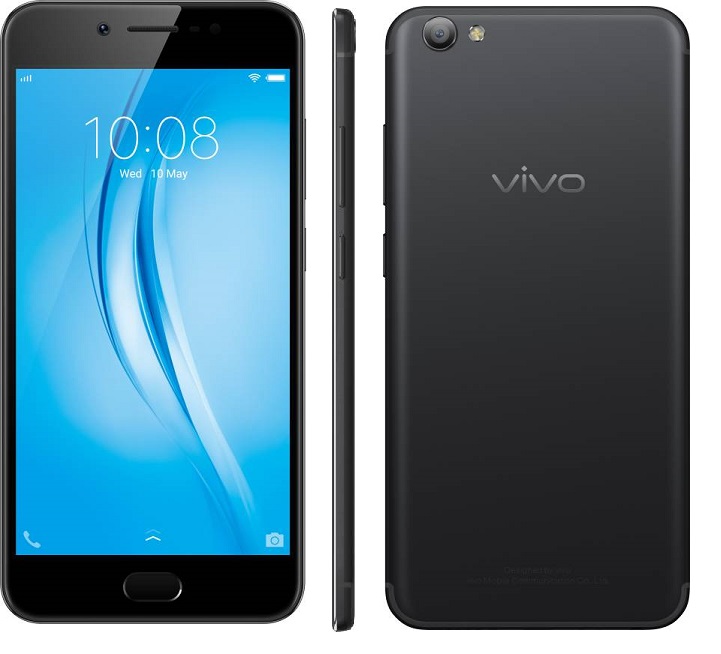
    With the success of Vivo V5 and Vivo V5 Plus smartphones, Vivo has launched one more selfie centric smartphone called as Vivo V5s.  20MP front facing camera with moonlight flash is the main USP of this device. In this post, let us have a quick into Vivo V5s Cons-Reasons for not to Buy according to us.

    Vivo V5s Cons

    Vivo V5s Cons-5 Reasons for not to Buy

    Demerits or disadvantages of Vivo V5s mentioned below are subjective. It is based on the availability of features on other smartphones in the similar price tag.

    • 720p Display panel: Vivo V5s comes with 5.5 inch IPS LCD panel with 1280×720 pixel resolution. Colors, viewing angles, sunlight legibility are good. But overall sharpness with around 267 ppi pixel density not impressive when compared with other 1080p resolution displays on Moto G5 Plus, Redmi Note 4 etc.
    • No Android Nougat Out of the box: Now new smartphones started coming with Android Nougat which is the latest version.  This means that, one need to wait for the updates. It would have been great if it was shipped with Android 7.0 out of the box.
    • Average rear camera performance: Vivo V5s comes with 13MP rear camera with LED flash. In day light conditions it takes decent photos, but in low light and artificial lighting condition performance way below than Moto G5 Plus.
    • Average gaming performance:  Vivo V5s is powered by 1.5 GHz Octa Core MediaTek MT6750 SoC with Mali-T860MP2 GPU and 4GB of RAM. This is the same configuration we have seen on Vivo V5. There was no noticeable lag in basic usages. However, it struggles in gaming sections. Stuttering and frame drops were observed while playing games like Asphalt 8. Casual games performance was decent.
    • Slightly over priced: Vivo V5s is a king when it comes to selfie department. However, when looking into overall performance, Rs.18,990 feels bit over priced.

    These are some of the Vivo V5s cons according to us. Choosing smartphone depends on the user priorities. Knowing the demerits of a device helps to know on what to expect from the device. Please share your thoughts on Vivo V5s in the comment section below.

  • Samsung Galaxy S8 Launched in India-Top 5 Features

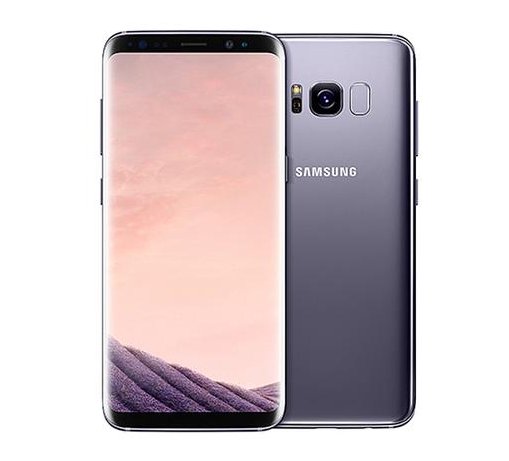
    Couple of days back, Samsung has launched much anticipated its flagship smartphones Galaxy S8 and Galaxy S8 Plus in India. With all new design and large display screen, there are many more features which makes it one of the strong contender for best flagship smartphone of the year 2017. Here are Samsung Galaxy S8 top 5 features according to us.

    You may like to read:

    How to clear cache in Galaxy S8

    Samsung Galaxy S8

    Samsung Galaxy S8 Top 5 features

    1.Design of Samsung Galaxy S8

    Biggest change in the Galaxy S8 and Galaxy S8 Plus is it is design. Samsung Galaxy smartphone signature Home button is no longer exists. Fingerprint scanner is moved to the backside of the device. Bezels around the display reduced to accommodate large screen in compact form factor. The front and back is made up glass which has Corning Gorilla Glass 5 for protection. All these makes Galaxy S8 and Galaxy S8 Plus standout from the other smartphone.

    2. Infinity Display Screen

    Samsung Galaxy S8 comes with 5.7 inch and Galaxy S8 Plus has 6.2 inch screen. Both smartphones has resolution of Quad HD+(1440×2960) pixels. High Dynamic Range(HDR) and Snap Window features and aspect ratio of 18.5:9 looks impressive.

    3.Samsung DeX

    Both Samsung Galaxy S8 and Galaxy S8 Plus comes with a optional accessory called Samsung DeX. It is a mobile to PC transition tool which can turn the device into Android based desktop when connected to a monitor.

    4.Dual Pixel technology Camera

    Samsung Galaxy S7 is considered as one of the best camera smartphone. Galaxy S8 and Galaxy S8 Plus with new optics, said to improve further. The front facing camera with facial recognition technology which recognise and track faces to provide focussed selfies.  The new camera app provides wide variety of filters, animated stcikers and stamps.

    5. Performance

    US variant of Galaxy S8 and Galaxy S8 plus comes with Snapdragon 835 SoC(2.35GHz quad-core + 1.7GHz quad-core). The smartphones launched in India are powered by Exynos 8895 SoC with an octa-core processor (2.35GHz quad-core + 1.9GHz quad-core). These 10nm processors is said to be Gigabit LTE and Gigabit Wi-Fi ready with support for download speeds up to 1Gbps.

    These are top 5 features of Samsung Galaxy S8  according to us. There are many more features such as Dual sim support, Samsung pay, Bixby(Virtual Assistance) etc. It comes preloaded with Google assistance as well. We will be making a detailed review on Galaxy S8 in the coming days to know the practical aspects of these features.